# claude-code-hub
**Repository Path**: odora/claude-code-hub
## Basic Information
- **Project Name**: claude-code-hub
- **Description**: No description available
- **Primary Language**: Unknown
- **License**: MIT
- **Default Branch**: main
- **Homepage**: None
- **GVP Project**: No
## Statistics
- **Stars**: 0
- **Forks**: 0
- **Created**: 2025-11-12
- **Last Updated**: 2025-11-12
## Categories & Tags
**Categories**: Uncategorized
**Tags**: None
## README
English | 中文
# Claude Code Hub
**🚀 Intelligent AI API relay platform — the control center for multi-provider onboarding, elastic routing, and granular operations**
[](https://github.com/ding113/claude-code-hub/pkgs/container/claude-code-hub)
[](LICENSE)
[](https://github.com/ding113/claude-code-hub/stargazers)
[](https://t.me/ygxz_group)
Claude Code Hub combines Next.js 15, Hono, PostgreSQL, and Redis to deliver a Claude/OpenAI-compatible API gateway with smart load balancing, live observability, price governance, and automated documentation, enabling teams to manage multiple AI vendors safely and transparently.
💬 **Join the discussion**: Questions about deployment, features or technical issues? Join our [Telegram community](https://t.me/ygxz_group)!
---
## ✨ Core Highlights
- 🤖 **Intelligent load balancing**: Weight + priority + grouping scheduler with built-in circuit breaker and up to three failover retries to keep requests stable.
- 🧩 **Multi-provider management**: Connect Claude, Codex, Gemini CLI, and OpenAI-compatible vendors simultaneously with per-provider model redirection and HTTP/HTTPS/SOCKS proxy rules.
- 🛡️ **Rate limiting & concurrency control**: Enforce RPM, monetary quotas (5-hour / weekly / monthly), and session concurrency via Redis Lua scripts with atomic counters and fail-open degradation.
- 📘 **Automated OpenAPI docs**: 39 REST endpoints exported from Server Actions into OpenAPI 3.1.0, instantly browsable in Swagger and Scalar UI.
- 📊 **Real-time monitoring & analytics**: Dashboards, active sessions, consumption leaderboards, decision-chain tracing, and proxy health tracking provide second-level visibility.
- 💰 **Price sheet management**: Paginated SQL queries with debounce search and LiteLLM sync keep thousands of model prices searchable in milliseconds.
- 🔁 **Session management**: Five-minute context cache preserves decision trails, reduces vendor switches, and maintains full auditability.
- 🔄 **OpenAI compatibility layer**: Supports `/v1/chat/completions`, handles format conversions, tool calls, reasoning fields, and Codex CLI instruction injection automatically.
## ⚡️ Quick Start
### Requirements
- Docker and Docker Compose (latest version recommended)
- Optional (for local development): Node.js ≥ 20, pnpm ≥ 9.15
### Three-Step Launch (Docker Compose)
1. **Clone and configure**
```bash
git clone https://github.com/ding113/claude-code-hub.git
cd claude-code-hub
cp .env.example .env
```
2. **Edit configuration**
Edit the `.env` file and **update** `ADMIN_TOKEN` (admin login token):
```bash
# MUST change this!
ADMIN_TOKEN=your-secure-token-here
# Docker Compose defaults (usually no changes needed)
DSN=postgres://postgres:postgres@postgres:5432/claude_code_hub
REDIS_URL=redis://redis:6379
```
3. **Start services**
```bash
docker compose up -d
```
Check status:
```bash
docker compose ps
docker compose logs -f app
```
### Access the application
Once started:
- **Admin Dashboard**: `http://localhost:23000` (login with `ADMIN_TOKEN` from `.env`)
- **API Docs (Scalar UI)**: `http://localhost:23000/api/actions/scalar`
- **API Docs (Swagger UI)**: `http://localhost:23000/api/actions/docs`
> 💡 **Tip**: To change the port, edit the `ports` section in `docker-compose.yml`.
## 🖼️ Screenshots
| Feature | Screenshot | Description |
| ------------------- | ---------------------------------------------------- | --------------------------------------------------------------------------------------------------------------------- |
| Dashboard |  | Aggregates request volume, spending, active sessions, and time-series distribution for instant situational awareness. |
| Provider management |  | Configure weight, cost multiplier, concurrency caps, proxies, and model redirection per vendor for precise routing. |
| Logs & audit |  | Unified request log with filters for time/user/provider/model plus token, cost, and cache-hit details. |
| Leaderboard |  | Ranks users by requests, tokens, and spending to support chargeback and usage governance. |
## 🏗️ Architecture
### High-level view
```
Clients / CLI / Integrations
│
▼
Next.js 15 App Router (v1 API routes)
│
Hono + Proxy Pipeline (Auth → Session Allocation → Rate Limiting → Provider Selection → Forwarding → Response Handling)
│
Multi-provider pool (Claude / OpenAI / Gemini / others) + PostgreSQL + Redis
```
- **App layer**: `src/app` hosts dashboards, settings, and API actions for UI and internal APIs.
- **Proxy core**: `src/app/v1/_lib/proxy-handler.ts` chains `ProxyAuthenticator`, `ProxySessionGuard`, `ProxyRateLimitGuard`, `ProxyProviderResolver`, `ProxyForwarder`, and `ProxyResponseHandler`.
- **Business logic**: `src/lib` contains rate limiting, session manager, circuit breaker, proxy utilities, and price-sync; `src/repository` encapsulates Drizzle ORM queries.
- **Documentation system**: `src/app/api/actions/[...route]/route.ts` converts Server Actions into OpenAPI endpoints automatically.
### Data flow & components
1. **Ingress**: Requests with API keys hit the Next.js route and pass through `ProxyAuthenticator`.
2. **Context control**: `SessionManager` fetches the five-minute cache from Redis, enforces concurrency, and records the decision chain.
3. **Rate limiting**: `RateLimitService` applies Lua-driven atomic counters for RPM, spend, and session caps, falling back gracefully if Redis is unavailable.
4. **Routing**: `ProxyProviderResolver` scores vendors with weights, priorities, breaker states, and session reuse, retrying up to three times.
5. **Forwarding & compatibility**: `ProxyForwarder` plus `ResponseTransformer` adapt Claude/OpenAI/Response formats, handle proxies, and honor model redirects.
6. **Observability**: Dashboards, leaderboards, and price sheets query PostgreSQL via repositories with hourly aggregations.
## 🚢 Deployment
### 🐳 Docker Compose (✨ Recommended, Production-Ready)
Docker Compose is the **preferred deployment method** — it automatically provisions the database, Redis, and application services without manual dependency installation, ideal for production quick-start.
1. Prepare `.env` (see `.env.example`) and point `DSN`/`REDIS_URL` to the Compose services.
2. Start the stack:
```bash
docker compose up -d
```
3. Monitor:
```bash
docker compose logs -f app
docker compose ps
```
4. Upgrade:
```bash
docker compose pull && docker compose up -d
```
Stop and clean up with `docker compose down` when necessary.
### Local development (dev toolchain)
1. Enter the `dev/` folder: `cd dev`.
2. Run `make dev` to launch PostgreSQL + Redis + `pnpm dev` in one command.
3. Helpful targets:
- `make db`: start only database and Redis.
- `make logs` / `make logs-app`: tail all services or app logs.
- `make clean` / `make reset`: clean or fully reset the environment.
4. Use `make migrate` and `make db-shell` for schema operations.
### Manual deployment (pnpm build + start)
1. Install dependencies and build:
```bash
pnpm install
pnpm build # Copies the VERSION file automatically
```
2. Export environment variables via your process manager (systemd, PM2, etc.) and ensure PostgreSQL/Redis endpoints are reachable.
3. Launch production server:
```bash
pnpm start
```
4. You may keep `AUTO_MIGRATE=true` for the first run, then disable it and manage migrations explicitly with Drizzle CLI.
## ⚙️ Configuration
| Variable | Default | Description |
| ------------------------------------------ | ------------------------ | ---------------------------------------------------------------------------------------------------- |
| `ADMIN_TOKEN` | `change-me` | Admin console token — must be updated before deployment. |
| `DSN` | - | PostgreSQL connection string, e.g., `postgres://user:pass@host:5432/db`. |
| `AUTO_MIGRATE` | `true` | Executes Drizzle migrations on startup; consider disabling in production for manual control. |
| `REDIS_URL` | `redis://localhost:6379` | Redis endpoint, supports `rediss://` for TLS providers. |
| `ENABLE_RATE_LIMIT` | `true` | Toggles multi-dimensional rate limiting; Fail-Open handles Redis outages gracefully. |
| `SESSION_TTL` | `300` | Session cache window (seconds) that drives vendor reuse. |
| `ENABLE_SECURE_COOKIES` | `true` | Browsers require HTTPS for Secure cookies; set to `false` when serving plain HTTP outside localhost. |
| `ENABLE_CIRCUIT_BREAKER_ON_NETWORK_ERRORS` | `false` | When `true`, network errors also trip the circuit breaker for quicker isolation. |
| `APP_PORT` | `23000` | Production port (override via container or process manager). |
| `APP_URL` | empty | Populate to expose correct `servers` entries in OpenAPI docs. |
> Boolean values should be `true/false` or `1/0` without quotes; otherwise Zod may coerce strings incorrectly. See `.env.example` for the full list.
## ❓ FAQ
1. **Database connection failures**
- Verify the `DSN` format and credentials; use service names (e.g., `postgres:5432`) within Docker.
- Inspect `docker compose ps` or local PostgreSQL status, and use `make db-shell` for deeper checks.
2. **What if Redis goes offline?**
- The platform uses a fail-open policy: rate limiting and session metrics degrade gracefully while requests continue flowing. Monitor logs for Redis errors and restore the service asap.
3. **Circuit breaker keeps opening**
- Inspect `[CircuitBreaker]` logs to see whether repeated 4xx/5xx or network errors triggered it.
- Check provider health in the admin console and wait 30 minutes or restart the app to reset state.
4. **“No provider available” errors**
- Ensure providers are enabled, have reasonable weights/priorities, and haven’t hit concurrency or spend caps.
- Review the decision-chain log to confirm whether breakers or proxy failures removed them.
5. **Proxy configuration issues**
- Make sure URLs include a protocol (`http://`, `socks5://`, etc.) and validate via the “Test Connection” button in the UI.
- If `proxy_fallback_to_direct` is enabled, confirm via logs that the system retried without the proxy when failures occur.
## 🤝 Contributing
We welcome issues and PRs! Please read [CONTRIBUTING.md](CONTRIBUTING.md) for the bilingual guidelines, branch strategy, and Conventional Commits requirements before submitting changes.
## 🌐 Acknowledgments
This project builds on [zsio/claude-code-hub](https://github.com/zsio/claude-code-hub) and references [router-for-me/CLIProxyAPI](https://github.com/router-for-me/CLIProxyAPI) for the OpenAI-compatible layer. Huge thanks to the original authors and community contributors!
## ⭐ Star History
[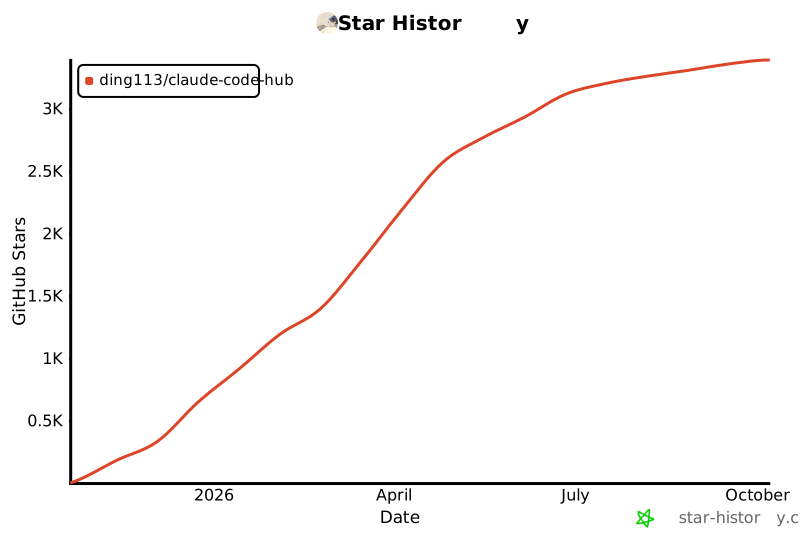](https://star-history.com/#ding113/claude-code-hub&Date)
## 📜 License
Released under the [MIT License](LICENSE). You’re welcome to use and extend the project as long as you comply with the license and retain the attribution.