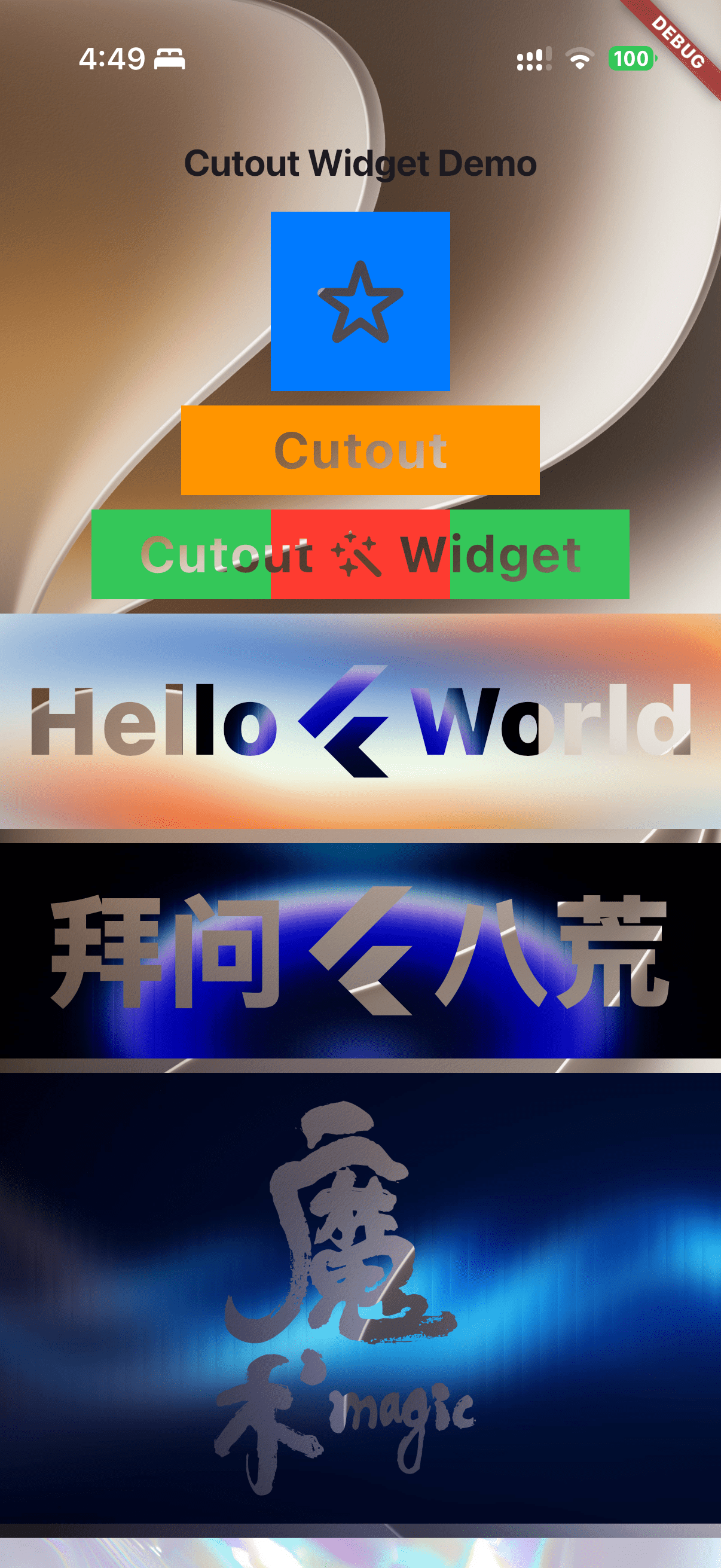
# flutter_cutout_widget
**Repository Path**: noob-coder/flutter_cutout_widget
## Basic Information
- **Project Name**: flutter_cutout_widget
- **Description**: A mask-driven cutout widget — punch through content to reveal what's beneath. 蒙版镂空组件,将指定形状从内容中挖除,透出底层背景。
- **Primary Language**: C++
- **License**: MIT
- **Default Branch**: master
- **Homepage**: None
- **GVP Project**: No
## Statistics
- **Stars**: 1
- **Forks**: 0
- **Created**: 2026-07-03
- **Last Updated**: 2026-07-04
## Categories & Tags
**Categories**: Uncategorized
**Tags**: None
## README
# 🪟 Cutout
A mask-driven cutout widget — punch through content to reveal what's beneath.
蒙版镂空组件,将指定形状从内容中挖除,透出底层背景。
[](https://pub.dev/packages/cutout)
[](LICENSE)
[](https://runoob-coder.github.io/flutter_cutout_widget/)
[](https://pub.dev/documentation/cutout/latest/)
[](https://github.com/runoob-coder/flutter_cutout_widget)
## ✨ Features / 特性
- **Any widget as mask** — Use icons, text, images, or any widget as the cutout shape
- **Images as mask** — Use transparent Image (eg. `PNG`) as cutout shapes
- **Flexible alignment** — Full control over mask positioning via `alignment`
---
- **任意组件做蒙版** — 支持图标、文字、图片或任意组合作为镂空形状
- **图片蒙版** — 使用带透明度图片(如 `PNG` )作为镂空底图
- **灵活对齐** — 通过 `alignment` 参数完全控制蒙版位置
## 🚀 Getting started / 快速开始
Install via pub.dev → [pub.dev/packages/cutout/install](https://pub.dev/packages/cutout/install)
## [📖 Usage / 使用示例](https://github.com/runoob-coder/flutter_cutout_widget/example/lib/main.dart)
https://runoob-coder.github.io/flutter_cutout_widget/
### Basic cutout with an icon / 使用图标镂空
```dart
Cutout(
alignment: Alignment.center,
maskChild: const Icon(Icons.star, size: 50),
child: Container(
width: 100,
height: 100,
color: Colors.blue,
),
)
```
### 🪟 Cutout with text / 使用文字镂空
```dart
Cutout(
alignment: Alignment.center,
maskChild: const Text(
'Cutout',
style: TextStyle(fontSize: 30, fontWeight: FontWeight.bold),
),
child: Container(
width: 200,
height: 50,
color: Colors.orange,
),
)
```
### Composable mask (icon + text) / 组合蒙版(图标+文字)
```dart
Cutout(
alignment: Alignment.center,
maskChild: const Row(
mainAxisSize: MainAxisSize.min, // must be min / 约束必须为 min
children: [
Text('Cutout', style: TextStyle(fontSize: 30, fontWeight: FontWeight.bold)),
Icon(Icons.auto_awesome, size: 30),
Text('Widget', style: TextStyle(fontSize: 30, fontWeight: FontWeight.bold)),
],
),
child: Container(
width: 300,
height: 50,
color: Colors.green,
),
)
```
### 🪟 Cutout over images / 图片镂空
```dart
SizedBox(
height: 120,
child: Stack(
alignment: Alignment.center,
children: [
// Background image showing through the holes / 底层背景透过镂空区域显示
Image.asset('assets/background.jpg'),
Cutout(
alignment: Alignment.center,
maskChild: const Row(
mainAxisSize: MainAxisSize.min,
children: [
Text('Hello', style: TextStyle(fontSize: 56, fontWeight: FontWeight.w900)),
FlutterLogo(size: 70),
Text('World', style: TextStyle(fontSize: 56, fontWeight: FontWeight.w900)),
],
),
child: Image.asset(
'assets/gradient.jpg',
fit: BoxFit.fill,
width: double.infinity,
),
),
],
),
)
```
### Transparent PNG as mask / 透明度图片做蒙版
```dart
Cutout(
alignment: Alignment.center,
maskChild: Image.asset('assets/magic.png', height: 220), // use an image with transparency / 请使用透明度图
child: Image.asset('assets/16-fractal-glass-hero-gradients.jpg'),
)
```
## ⚙️ How it works / 原理
```
1. Content children → rasterized into offscreen buffer
2. Mask child drawn with BlendMode.dstOut → opaque mask pixels punch holes
3. Buffer composited back onto canvas
```
```
1. 内容子组件 → 光栅化到离屏缓冲区
2. 蒙版子组件以 BlendMode.dstOut 绘制 → 不透明像素在内容上镂空
3. 缓冲区合成回Canvas
```
## ⚠️ Important / 重要提示
> [!IMPORTANT]
> Content children that push their own composited layers — such as `AnimatedSwitcher`, `Opacity`, `FadeTransition`, `ClipRect`, `Transform`, `BackdropFilter`, etc. — will have those layers composite **outside** the internal `saveLayer` buffer, defeating the mask effect.
>
> **Avoid nesting layer-pushing widgets inside `Cutout.child` !**
>
> This is a fundamental limitation of Flutter's compositing pipeline and cannot be fixed at the framework level — it would require changes to the Flutter engine itself. If you have a solution, PRs are welcome!
`RenderCutout.paintStack` isolates content inside a `canvas.saveLayer` buffer,
but when `context.paintChild` draws a content child (e.g. `FadeTransition` inside `AnimatedSwitcher`),
the child may push its own composited layer (e.g. `OpacityLayer`) into the layer tree via `pushOpacity`.
These layers become siblings of the current `ContainerLayer` and escape the `saveLayer` buffer,
breaking the `dstOut` cutout.
---
> [!IMPORTANT]
> 如果 `Cutout.child` 中包含会推送自身合成层的组件(如 `AnimatedSwitcher`、`Opacity`、`FadeTransition`、`ClipRect`、`Transform`、`BackdropFilter` 等),这些层会在内部 `saveLayer` 缓冲区**外部**合成,导致镂空失效。
>
> **避免在 `Cutout.child` 中嵌套会推送层的组件!**
>
> 这是 Flutter 合成管线的底层限制,无法在框架层修复 — 需要调整 Flutter 引擎本身。如果你有解决方案,欢迎贡献 PR!
`RenderCutout.paintStack` 使用 `canvas.saveLayer` 做外层隔离,
但 `context.paintChild` 绘制内容子节点时,子节点(如 AnimatedSwitcher 内部的 `FadeTransition`)
可能通过 `pushOpacity` 等调用向 `layer tree` 推入独立的合成层(如 `OpacityLayer`)。
这些合成层是当前 `ContainerLayer` 的兄弟节点,会逃逸出 `saveLayer` 缓冲区,导致`dstOut`镂空失效。
## [📋 API](https://pub.dev/documentation/cutout)
| Parameter | Type | Default | Description / 说明 |
|---|---|---|---|
| `maskChild` | `Widget` | **required** | The shape to punch through / 用于镂空的形状 |
| `child` | `Widget` | **required** | The content to be cut through / 被镂空的内容 |
| `alignment` | `AlignmentGeometry` | `Alignment.topStart` | Mask alignment / 蒙版对齐方式 |
| `textDirection` | `TextDirection?` | `null` | Text direction for alignment / 文本方向 |
| `fit` | `StackFit` | `StackFit.loose` | How to size the stack / Stack尺寸约束 |
| `clip` | `Clip` | `Clip.hardEdge` | Clip behavior / 裁剪行为 |
## 📎 Additional information / 更多信息
- **Homepage:** [GitHub](https://github.com/runoob-coder/flutter_cutout_widget)
- **Issue Tracker:** [GitHub Issues](https://github.com/runoob-coder/flutter_cutout_widget/issues)
## 💛 Support / 支持
If `Cutout` helps you build better UIs, please consider supporting it.
It only takes a few seconds and helps other Flutter developers discover the library.
如果 `Cutout` 帮助了你,请考虑支持它,只需几秒即可帮助更多 Flutter 开发者发现此库。
- ⭐ [Star on GitHub](https://github.com/runoob-coder/flutter_cutout_widget) / [GitHub 上点星](https://github.com/runoob-coder/flutter_cutout_widget)
- 👍 [Like on pub.dev](https://pub.dev/packages/cutout) / [pub.dev 上点赞](https://pub.dev/packages/cutout)
## ☕️ Buy Me a Coffee / 请我喝咖啡