 


 

 .
- **Gradio Theme**: If you use Gradio for development, check out our theme here: [kotaemon-gradio-theme](https://github.com/lone17/kotaemon-gradio-theme).
## Key Features
- **Host your own document QA (RAG) web-UI**: Support multi-user login, organize your files in private/public collections, collaborate and share your favorite chat with others.
- **Organize your LLM & Embedding models**: Support both local LLMs & popular API providers (OpenAI, Azure, Ollama, Groq).
- **Hybrid RAG pipeline**: Sane default RAG pipeline with hybrid (full-text & vector) retriever and re-ranking to ensure best retrieval quality.
- **Multi-modal QA support**: Perform Question Answering on multiple documents with figures and tables support. Support multi-modal document parsing (selectable options on UI).
- **Advanced citations with document preview**: By default the system will provide detailed citations to ensure the correctness of LLM answers. View your citations (incl. relevant score) directly in the _in-browser PDF viewer_ with highlights. Warning when retrieval pipeline return low relevant articles.
- **Support complex reasoning methods**: Use question decomposition to answer your complex/multi-hop question. Support agent-based reasoning with `ReAct`, `ReWOO` and other agents.
- **Configurable settings UI**: You can adjust most important aspects of retrieval & generation process on the UI (incl. prompts).
- **Extensible**: Being built on Gradio, you are free to customize or add any UI elements as you like. Also, we aim to support multiple strategies for document indexing & retrieval. `GraphRAG` indexing pipeline is provided as an example.

## Installation
> If you are not a developer and just want to use the app, please check out our easy-to-follow [User Guide](https://cinnamon.github.io/kotaemon/). Download the `.zip` file from the [latest release](https://github.com/Cinnamon/kotaemon/releases/latest) to get all the newest features and bug fixes.
### System requirements
1. [Python](https://www.python.org/downloads/) >= 3.10
2. [Docker](https://www.docker.com/): optional, if you [install with Docker](#with-docker-recommended)
3. [Unstructured](https://docs.unstructured.io/open-source/installation/full-installation#full-installation) if you want to process files other than `.pdf`, `.html`, `.mhtml`, and `.xlsx` documents. Installation steps differ depending on your operating system. Please visit the link and follow the specific instructions provided there.
### With Docker (recommended)
1. We support both `lite` & `full` version of Docker images. With `full` version, the extra packages of `unstructured` will be installed, which can support additional file types (`.doc`, `.docx`, ...) but the cost is larger docker image size. For most users, the `lite` image should work well in most cases.
- To use the `full` version.
```bash
docker run \
-e GRADIO_SERVER_NAME=0.0.0.0 \
-e GRADIO_SERVER_PORT=7860 \
-v ./ktem_app_data:/app/ktem_app_data \
-p 7860:7860 -it --rm \
ghcr.io/cinnamon/kotaemon:main-full
```
- To use the `full` version with bundled **Ollama** for _local / private RAG_.
```bash
# change image name to
docker run <...> ghcr.io/cinnamon/kotaemon:main-ollama
```
- To use the `lite` version.
```bash
# change image name to
docker run <...> ghcr.io/cinnamon/kotaemon:main-lite
```
2. We currently support and test two platforms: `linux/amd64` and `linux/arm64` (for newer Mac). You can specify the platform by passing `--platform` in the `docker run` command. For example:
```bash
# To run docker with platform linux/arm64
docker run \
-e GRADIO_SERVER_NAME=0.0.0.0 \
-e GRADIO_SERVER_PORT=7860 \
-v ./ktem_app_data:/app/ktem_app_data \
-p 7860:7860 -it --rm \
--platform linux/arm64 \
ghcr.io/cinnamon/kotaemon:main-lite
```
3. Once everything is set up correctly, you can go to `http://localhost:7860/` to access the WebUI.
4. We use [GHCR](https://docs.github.com/en/packages/working-with-a-github-packages-registry/working-with-the-container-registry) to store docker images, all images can be found [here.](https://github.com/Cinnamon/kotaemon/pkgs/container/kotaemon)
### Without Docker
1. Clone and install required packages on a fresh python environment.
```shell
# optional (setup env)
conda create -n kotaemon python=3.10
conda activate kotaemon
# clone this repo
git clone https://github.com/Cinnamon/kotaemon
cd kotaemon
pip install -e "libs/kotaemon[all]"
pip install -e "libs/ktem"
```
2. Create a `.env` file in the root of this project. Use `.env.example` as a template
The `.env` file is there to serve use cases where users want to pre-config the models before starting up the app (e.g. deploy the app on HF hub). The file will only be used to populate the db once upon the first run, it will no longer be used in consequent runs.
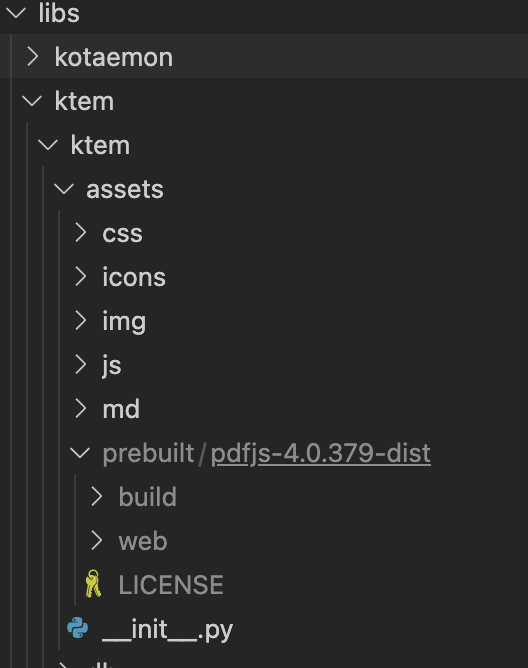
3. (Optional) To enable in-browser `PDF_JS` viewer, download [PDF_JS_DIST](https://github.com/mozilla/pdf.js/releases/download/v4.0.379/pdfjs-4.0.379-dist.zip) then extract it to `libs/ktem/ktem/assets/prebuilt`
.
- **Gradio Theme**: If you use Gradio for development, check out our theme here: [kotaemon-gradio-theme](https://github.com/lone17/kotaemon-gradio-theme).
## Key Features
- **Host your own document QA (RAG) web-UI**: Support multi-user login, organize your files in private/public collections, collaborate and share your favorite chat with others.
- **Organize your LLM & Embedding models**: Support both local LLMs & popular API providers (OpenAI, Azure, Ollama, Groq).
- **Hybrid RAG pipeline**: Sane default RAG pipeline with hybrid (full-text & vector) retriever and re-ranking to ensure best retrieval quality.
- **Multi-modal QA support**: Perform Question Answering on multiple documents with figures and tables support. Support multi-modal document parsing (selectable options on UI).
- **Advanced citations with document preview**: By default the system will provide detailed citations to ensure the correctness of LLM answers. View your citations (incl. relevant score) directly in the _in-browser PDF viewer_ with highlights. Warning when retrieval pipeline return low relevant articles.
- **Support complex reasoning methods**: Use question decomposition to answer your complex/multi-hop question. Support agent-based reasoning with `ReAct`, `ReWOO` and other agents.
- **Configurable settings UI**: You can adjust most important aspects of retrieval & generation process on the UI (incl. prompts).
- **Extensible**: Being built on Gradio, you are free to customize or add any UI elements as you like. Also, we aim to support multiple strategies for document indexing & retrieval. `GraphRAG` indexing pipeline is provided as an example.

## Installation
> If you are not a developer and just want to use the app, please check out our easy-to-follow [User Guide](https://cinnamon.github.io/kotaemon/). Download the `.zip` file from the [latest release](https://github.com/Cinnamon/kotaemon/releases/latest) to get all the newest features and bug fixes.
### System requirements
1. [Python](https://www.python.org/downloads/) >= 3.10
2. [Docker](https://www.docker.com/): optional, if you [install with Docker](#with-docker-recommended)
3. [Unstructured](https://docs.unstructured.io/open-source/installation/full-installation#full-installation) if you want to process files other than `.pdf`, `.html`, `.mhtml`, and `.xlsx` documents. Installation steps differ depending on your operating system. Please visit the link and follow the specific instructions provided there.
### With Docker (recommended)
1. We support both `lite` & `full` version of Docker images. With `full` version, the extra packages of `unstructured` will be installed, which can support additional file types (`.doc`, `.docx`, ...) but the cost is larger docker image size. For most users, the `lite` image should work well in most cases.
- To use the `full` version.
```bash
docker run \
-e GRADIO_SERVER_NAME=0.0.0.0 \
-e GRADIO_SERVER_PORT=7860 \
-v ./ktem_app_data:/app/ktem_app_data \
-p 7860:7860 -it --rm \
ghcr.io/cinnamon/kotaemon:main-full
```
- To use the `full` version with bundled **Ollama** for _local / private RAG_.
```bash
# change image name to
docker run <...> ghcr.io/cinnamon/kotaemon:main-ollama
```
- To use the `lite` version.
```bash
# change image name to
docker run <...> ghcr.io/cinnamon/kotaemon:main-lite
```
2. We currently support and test two platforms: `linux/amd64` and `linux/arm64` (for newer Mac). You can specify the platform by passing `--platform` in the `docker run` command. For example:
```bash
# To run docker with platform linux/arm64
docker run \
-e GRADIO_SERVER_NAME=0.0.0.0 \
-e GRADIO_SERVER_PORT=7860 \
-v ./ktem_app_data:/app/ktem_app_data \
-p 7860:7860 -it --rm \
--platform linux/arm64 \
ghcr.io/cinnamon/kotaemon:main-lite
```
3. Once everything is set up correctly, you can go to `http://localhost:7860/` to access the WebUI.
4. We use [GHCR](https://docs.github.com/en/packages/working-with-a-github-packages-registry/working-with-the-container-registry) to store docker images, all images can be found [here.](https://github.com/Cinnamon/kotaemon/pkgs/container/kotaemon)
### Without Docker
1. Clone and install required packages on a fresh python environment.
```shell
# optional (setup env)
conda create -n kotaemon python=3.10
conda activate kotaemon
# clone this repo
git clone https://github.com/Cinnamon/kotaemon
cd kotaemon
pip install -e "libs/kotaemon[all]"
pip install -e "libs/ktem"
```
2. Create a `.env` file in the root of this project. Use `.env.example` as a template
The `.env` file is there to serve use cases where users want to pre-config the models before starting up the app (e.g. deploy the app on HF hub). The file will only be used to populate the db once upon the first run, it will no longer be used in consequent runs.
3. (Optional) To enable in-browser `PDF_JS` viewer, download [PDF_JS_DIST](https://github.com/mozilla/pdf.js/releases/download/v4.0.379/pdfjs-4.0.379-dist.zip) then extract it to `libs/ktem/ktem/assets/prebuilt`
 4. Start the web server:
```shell
python app.py
```
- The app will be automatically launched in your browser.
- Default username and password are both `admin`. You can set up additional users directly through the UI.

5. Check the `Resources` tab and `LLMs and Embeddings` and ensure that your `api_key` value is set correctly from your `.env` file. If it is not set, you can set it there.
### Setup GraphRAG
> [!NOTE]
> Official MS GraphRAG indexing only works with OpenAI or Ollama API.
> We recommend most users to use NanoGraphRAG implementation for straightforward integration with Kotaemon.
4. Start the web server:
```shell
python app.py
```
- The app will be automatically launched in your browser.
- Default username and password are both `admin`. You can set up additional users directly through the UI.

5. Check the `Resources` tab and `LLMs and Embeddings` and ensure that your `api_key` value is set correctly from your `.env` file. If it is not set, you can set it there.
### Setup GraphRAG
> [!NOTE]
> Official MS GraphRAG indexing only works with OpenAI or Ollama API.
> We recommend most users to use NanoGraphRAG implementation for straightforward integration with Kotaemon.