
NETworkManager
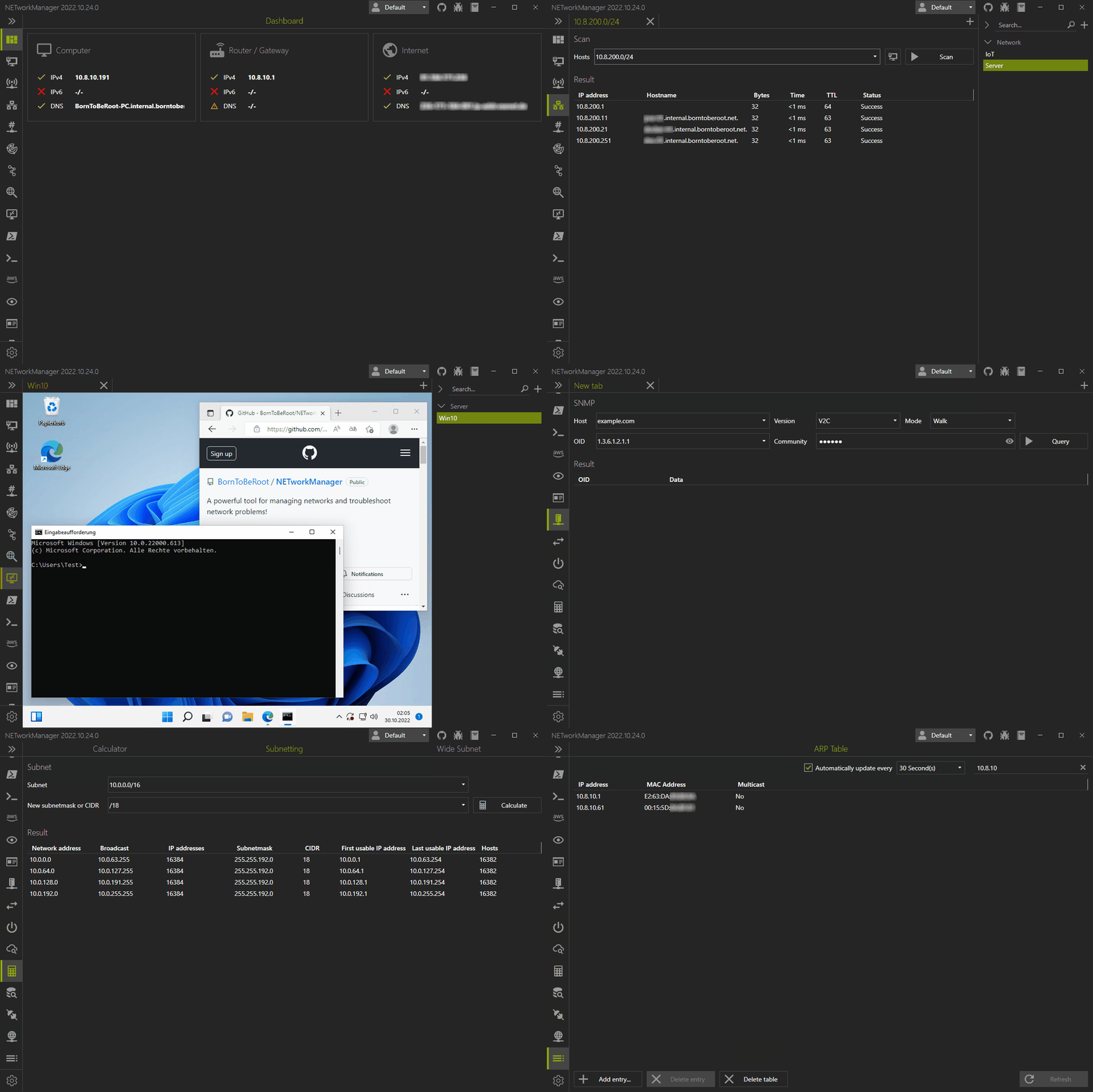
A powerful open source tool for managing networks and troubleshooting network problems!
Connect and manage remote systems with Remote Desktop, PowerShell, PuTTY, TigerVNC or AWS (Systems Manager) Session Manager. Analyze and troubleshoot your network and systems with features such as the WiFi Analyzer, IP Scanner, Port Scanner, Ping Monitor, Traceroute, DNS lookup or LLDP/CDP capture (and many more) in a unfied interface. Hosts (or networks) can be saved in (encrypted) profiles and used across all features.











Download • Changelog • Documentation • Contributing • Build • License
 ## 📦 Download
Prebuilt binaries (setup, portable and archive) are available on the [download page](https://borntoberoot.net/NETworkManager/Download). Here you will also find the system requirements and how to install the application silent. The files are provided via [GitHub releases](https://github.com/BornToBeRoot/NETworkManager/releases/latest).
In addition, NETworkManager is available through the package managers [Chocolatey](https://chocolatey.org/packages/NETworkManager), [WinGet](https://github.com/microsoft/winget-pkgs/tree/master/manifests/b/BornToBeRoot/NETworkManager/) and [Evergreen](https://stealthpuppy.com/evergreen/apps/):
```PowerShell
# Chocolatey
choco install networkmanager
# WinGet
winget install BornToBeRoot.NETworkManager
# Evergreen
Get-EvergreenApp -Name NETworkManager | Save-EvergreenApp -Path C:\Users\$env:Username\Downloads\
```
## 📃 Changelog
You can find the changelog for each version [here](https://borntoberoot.net/NETworkManager/Changelog).
## 📖 Documentation
The documentation is provided via GitHub pages and can be found [here](https://borntoberoot.net/NETworkManager/docs/introduction).
## ✨ Contributing
Here you will find ways to contribute:
- [Request a feature, report a bug or ask a question](CONTRIBUTING.md#contributing)
- [Add a feature or fix a bug](CONTRIBUTING.md#code)
- [Add or improve a translation](CONTRIBUTING.md#translation)
- [Improve the documentation](CONTRIBUTING.md#documentation)
- [Report a security vulnerability](https://github.com/BornToBeRoot/NETworkManager/blob/main/SECURITY.md)
A list of all contributors can be found [here](https://github.com/BornToBeRoot/NETworkManager/blob/main/Contributors.md).
This project has adopted the [code of conduct](https://github.com/BornToBeRoot/NETworkManager/blob/main/CODE_OF_CONDUCT.md) defined by the [Contributor Covenant](https://contributor-covenant.org/).
## 🔧 Build
You can build the application like any other .NET / WPF application on Windows.
1. Make sure that the following requirements are installed:
- [.NET 8.x - SDK](https://dotnet.microsoft.com/download/dotnet/8.0)
- Visual Studio 2022 with `.NET desktop development` and `Universal Windows Platform development`
2. Clone the repository with all submodules:
```PowerShell
# Clone the repository
git clone https://github.com/BornToBeRoot/NETworkManager
# Navigate to the repository
cd NETworkManager
# Clone the submodules
git submodule update --init
```
3. Open the project file `.\Source\NETworkManager.sln` with Visual Studio or JetBrains Rider to build (or debug)
the solution.
> **ALTERNATIVE**
>
> With the following commands you can directly build the binaries from the command line:
>
> ```PowerShell
> dotnet restore .\Source\NETworkManager.sln
>
> dotnet build .\Source\NETworkManager.sln --configuration Release --no-restore
> ```
## 📝 License
NETworkManager is published under the [GNU General Public License v3](https://github.com/BornToBeRoot/NETworkManager/blob/main/LICENSE). The licenses of the used libraries can be found [here](https://github.com/BornToBeRoot/NETworkManager/tree/main/Source/NETworkManager.Documentation/Licenses).
## 📦 Download
Prebuilt binaries (setup, portable and archive) are available on the [download page](https://borntoberoot.net/NETworkManager/Download). Here you will also find the system requirements and how to install the application silent. The files are provided via [GitHub releases](https://github.com/BornToBeRoot/NETworkManager/releases/latest).
In addition, NETworkManager is available through the package managers [Chocolatey](https://chocolatey.org/packages/NETworkManager), [WinGet](https://github.com/microsoft/winget-pkgs/tree/master/manifests/b/BornToBeRoot/NETworkManager/) and [Evergreen](https://stealthpuppy.com/evergreen/apps/):
```PowerShell
# Chocolatey
choco install networkmanager
# WinGet
winget install BornToBeRoot.NETworkManager
# Evergreen
Get-EvergreenApp -Name NETworkManager | Save-EvergreenApp -Path C:\Users\$env:Username\Downloads\
```
## 📃 Changelog
You can find the changelog for each version [here](https://borntoberoot.net/NETworkManager/Changelog).
## 📖 Documentation
The documentation is provided via GitHub pages and can be found [here](https://borntoberoot.net/NETworkManager/docs/introduction).
## ✨ Contributing
Here you will find ways to contribute:
- [Request a feature, report a bug or ask a question](CONTRIBUTING.md#contributing)
- [Add a feature or fix a bug](CONTRIBUTING.md#code)
- [Add or improve a translation](CONTRIBUTING.md#translation)
- [Improve the documentation](CONTRIBUTING.md#documentation)
- [Report a security vulnerability](https://github.com/BornToBeRoot/NETworkManager/blob/main/SECURITY.md)
A list of all contributors can be found [here](https://github.com/BornToBeRoot/NETworkManager/blob/main/Contributors.md).
This project has adopted the [code of conduct](https://github.com/BornToBeRoot/NETworkManager/blob/main/CODE_OF_CONDUCT.md) defined by the [Contributor Covenant](https://contributor-covenant.org/).
## 🔧 Build
You can build the application like any other .NET / WPF application on Windows.
1. Make sure that the following requirements are installed:
- [.NET 8.x - SDK](https://dotnet.microsoft.com/download/dotnet/8.0)
- Visual Studio 2022 with `.NET desktop development` and `Universal Windows Platform development`
2. Clone the repository with all submodules:
```PowerShell
# Clone the repository
git clone https://github.com/BornToBeRoot/NETworkManager
# Navigate to the repository
cd NETworkManager
# Clone the submodules
git submodule update --init
```
3. Open the project file `.\Source\NETworkManager.sln` with Visual Studio or JetBrains Rider to build (or debug)
the solution.
> **ALTERNATIVE**
>
> With the following commands you can directly build the binaries from the command line:
>
> ```PowerShell
> dotnet restore .\Source\NETworkManager.sln
>
> dotnet build .\Source\NETworkManager.sln --configuration Release --no-restore
> ```
## 📝 License
NETworkManager is published under the [GNU General Public License v3](https://github.com/BornToBeRoot/NETworkManager/blob/main/LICENSE). The licenses of the used libraries can be found [here](https://github.com/BornToBeRoot/NETworkManager/tree/main/Source/NETworkManager.Documentation/Licenses).