# antd-pro-page-tabs
**Repository Path**: kevin402502/antd-pro-page-tabs
## Basic Information
- **Project Name**: antd-pro-page-tabs
- **Description**: Page tab component for Ant Design Pro and UmiJS projects
- **Primary Language**: Unknown
- **License**: MIT
- **Default Branch**: master
- **Homepage**: None
- **GVP Project**: No
## Statistics
- **Stars**: 0
- **Forks**: 0
- **Created**: 2021-06-17
- **Last Updated**: 2021-06-17
## Categories & Tags
**Categories**: Uncategorized
**Tags**: None
## README
# antd-pro-page-tabs
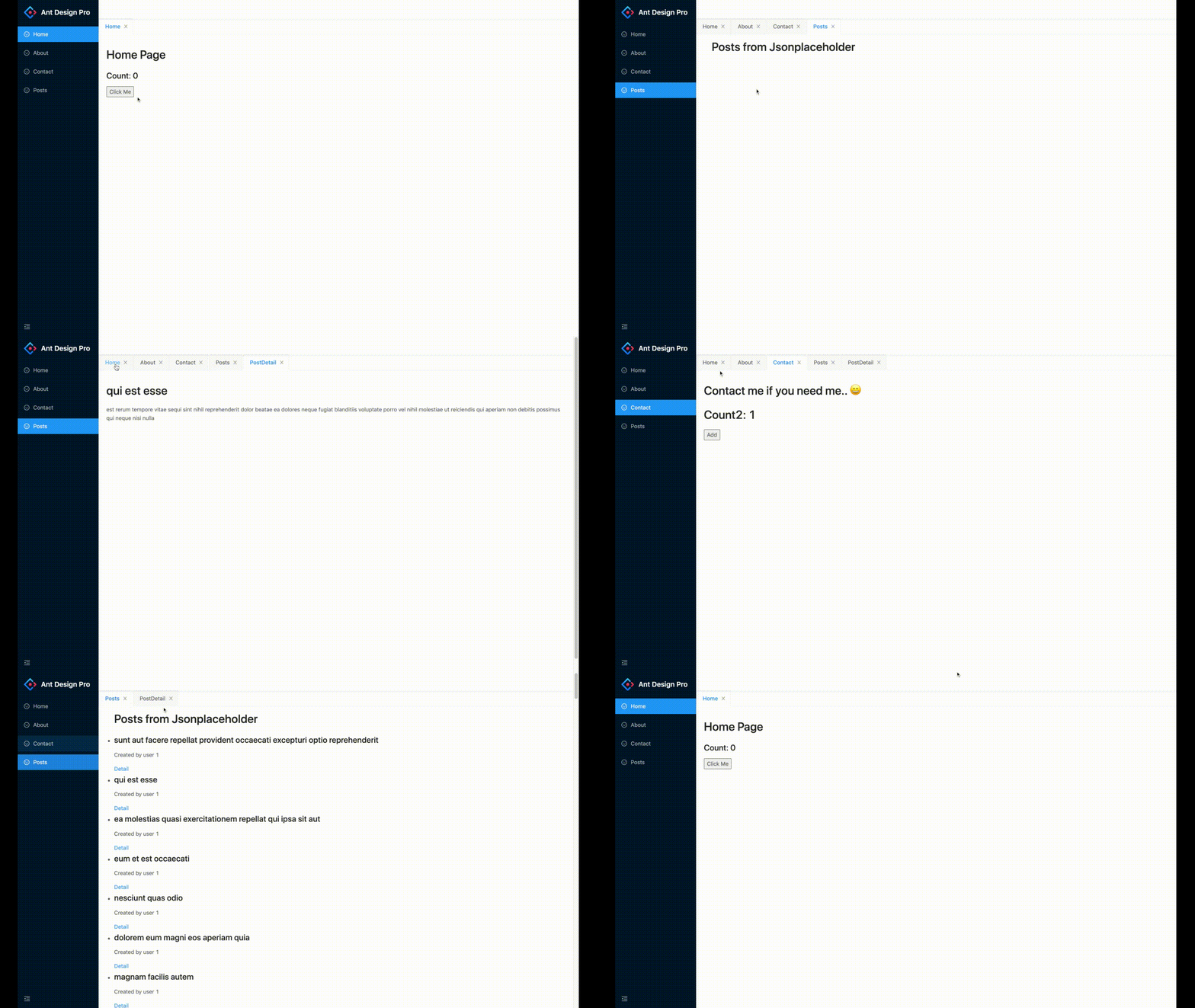
Page tabs component for umi or ant design pro projects. 🚴🏻
# Demos
* [UmiJS project](https://github.com/MudOnTire/page-tabs-umi-app)
* [Ant design pro@4 project](https://github.com/MudOnTire/page-tabs-ant-pro4-app)
# Features
* Enable/disable opening pages in tab by setting `RouteWatcher` or not
* Keep pages' states alive when switching between tabs
* Close opened tabs by click `x` button
* Tab and route is a one-to-one relationship, pages of different route will be in different tabs, different pages of same route (like news detail pages) will be in the same tab (new page replace the old)
* If all tabs are closed, page of root route `'/'` will be opened
* With right-click context menus to: 1. close target tab; 2. close tabs to the right; 3. close all tabs.
* I18n support
# Requirements
* React >= 16.8.x (I use react hooks under the hood)
* UmiJS >= 3.x
* Ant Design >= 4
# Usage
## 📦📦 Install
```sh
yarn add antd-pro-page-tabs
```
or
```sh
npm install antd-pro-page-tabs
```
## 🔧🔧 Setup
This project depends on [umi](https://umijs.org/)'s [routing system](https://umijs.org/docs/routing) and [@umijs/plugin-layout
](https://umijs.org/plugins/plugin-layout), all top level routes should be wrapped in a `TabLayout`, and pages need to be displayed in a `Tab` should be wrapped by a `RouteWatcher` in order to notify the library when that page open..
Since umi's config file only receive strings as route component's values, we can create two files in our project and import/export `TabLayout` and `RouteWatcher` from the library.
For example, we create `TabLayout.tsx` and `RouteWatcher.tsx` in `src/components/PageTab`:
**TabLayout.tsx:**
```js
import { TabLayout } from 'antd-pro-page-tabs';
export default TabLayout;
```
To customize context menu labels, you can:
```js
import React from 'react'
import { TabLayout } from 'antd-pro-page-tabs';
const contextMenuLabels = {
closeTab: '关闭标签',
closeRightTabs: '关闭右侧标签',
closeAllTabs: '关闭所有标签'
}
export default (props: any) => {
const { children } = props
return (
)
}
```
And, here we go!

**RouteWatcher.tsx**
```js
import { RouteWatcher } from 'antd-pro-page-tabs';
export default RouteWatcher;
```
### 🌍🌍 I18N
If your website need i18n, you can dynamically set a `tabLocalName` with its value set to a local version:
```js
import React from 'react';
import { RouteWatcher } from 'antd-pro-page-tabs';
import { useIntl } from 'umi';
export default function (props: any) {
const intl = useIntl();
const { route } = props;
if (route.tabLocalId) {
route.tabLocalName = intl.formatMessage({ id: route.tabLocalId, defaultMessage: route.name });
}
return
}
```
Next, we update the routing configuration of our project:
```js
const RouteWatcher = '@/components/PageTab/RouteWatcher';
export default {
...
// i18n support
locale: {
default: 'zh-CN',
antd: true,
baseNavigator: true,
baseSeparator: '-',
},
routes: [
{
path: '/',
component: '@/components/PageTab/TabLayout',
flatMenu: true, // lift sub-routes up to top
routes: [
{
name: 'Home',
tabLocalId: 'menu.Home', // id for i18n
icon: 'smile',
path: '/home',
component: '@/pages/home',
wrappers: [RouteWatcher],
},
{
name: 'About',
tabLocalId: 'menu.About',
icon: 'smile',
path: '/about',
component: '@/pages/about',
wrappers: [RouteWatcher],
},
{
name: 'Contact',
tabLocalId: 'menu.Contact',
icon: 'smile',
path: '/contact',
component: '@/pages/contact',
wrappers: [RouteWatcher],
}
],
},
],
}
```
**💥 Don't forget to set `flatMenu` of the root route to `true`, it will hide the root route menu and lift the sub-routes to the top level, and then menus will be created for them.**
### 💎💎 **How to use with `BasicLayout`?**
If your projects use customized layouts such as `BasicLayout` instead of [pro-layout](https://www.npmjs.com/package/@ant-design/pro-layout) directly,to use page tabs with these layouts we can simply wrap `children` with `TabLayout` component:
**BasicLayout.js:**
```tsx
import { TabLayout } from 'antd-pro-page-tabs';
function BasicLayout(props){
return (
{children}
)
}
```
> You can find the full demo [Here!](https://github.com/MudOnTire/page-tabs-ant-pro4-app)
# Todos
* Add APIs to close specific tabs programmatically
* Add APIs to enable customizing tab bar or tab styles
* etc..
Any suggestion is welcomed. Enjoy! 🎈