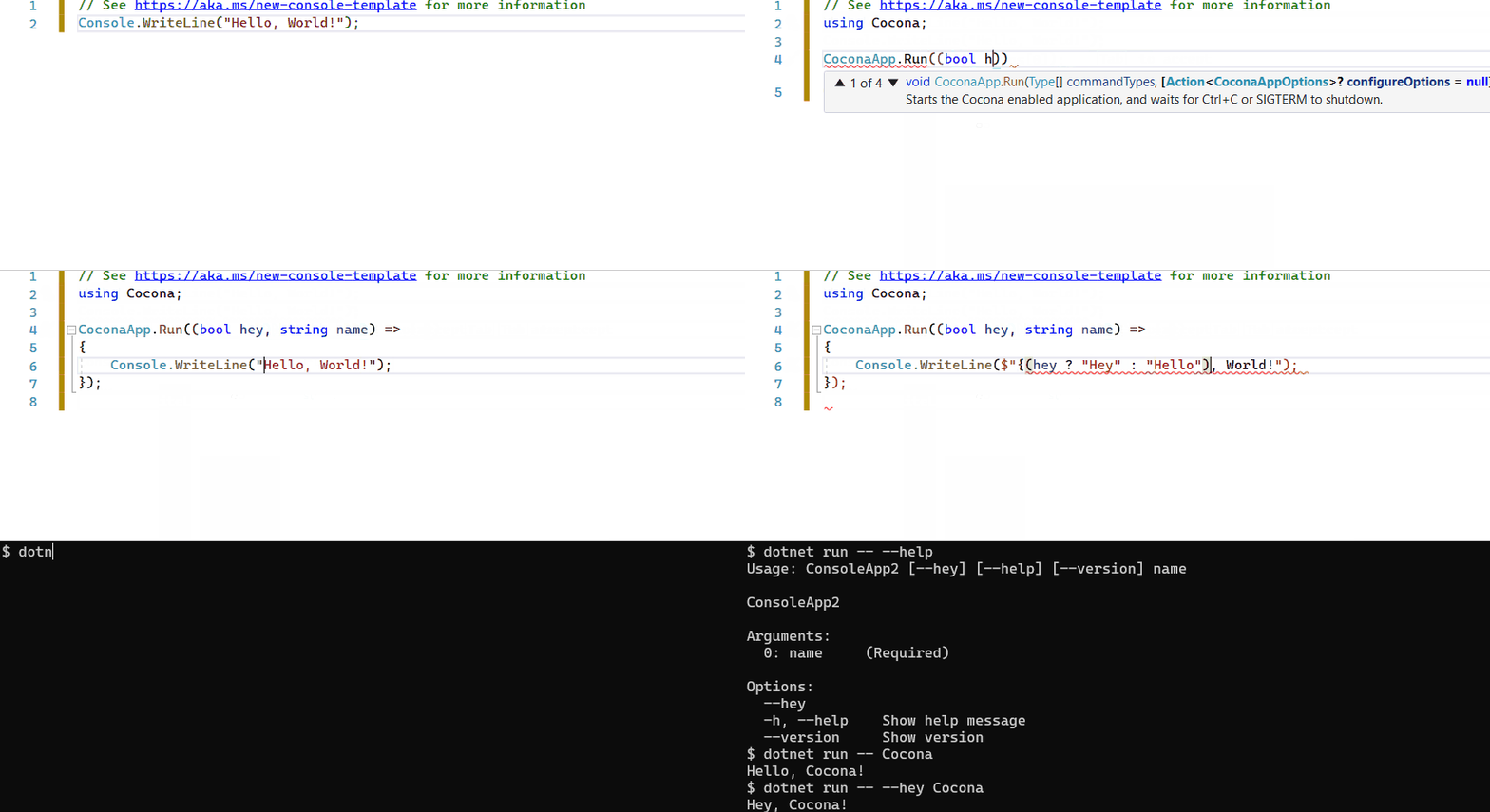
# Cocona **Repository Path**: dotnet-cafe/Cocona ## Basic Information - **Project Name**: Cocona - **Description**: Micro-framework for .NET console application. Cocona makes it easy and fast to build console applications on .NET. - **Primary Language**: C# - **License**: MIT - **Default Branch**: master - **Homepage**: None - **GVP Project**: No ## Statistics - **Stars**: 0 - **Forks**: 0 - **Created**: 2022-02-07 - **Last Updated**: 2022-02-07 ## Categories & Tags **Categories**: Uncategorized **Tags**: None ## README # ![Cocona](https://raw.githubusercontent.com/mayuki/Cocona/master/docs/assets/logo.svg) Micro-framework for .NET **Co**re **con**sole **a**pplication. Cocona makes it easy and fast to build console applications on .NET.🚀 [![Build Status](https://dev.azure.com/misuzilla/Cocona/_apis/build/status/Cocona?branchName=master)](https://dev.azure.com/misuzilla/Cocona/_build/latest?definitionId=18&branchName=master) [![NuGet Package: Cocona](https://img.shields.io/nuget/vpre/Cocona?label=NuGet%3A%20Cocona)](https://www.nuget.org/packages/Cocona) [![NuGet Package: Cocona.Lite](https://img.shields.io/nuget/vpre/Cocona.Lite?label=NuGet%3A%20Cocona.Lite)](https://www.nuget.org/packages/Cocona.Lite) ### ⏱ Create a console application with Cocona in seconds. ```csharp CoconaApp.Run((string? name, bool hey) => Console.WriteLine("{(hey ? "Hey" :"Hello")} {(name ?? "Guest")}!")); ``` ![](https://raw.githubusercontent.com/mayuki/Cocona/master/docs/assets/intro-in-seconds.gif) ## Feature - 🚀 **Make it easy to build console applications on .NET.** - ASP.NET Core-like Minimal API - `public` method as a command - Provides ASP.NET Core MVC-like development experience to console application development. - ✨ **Command-line option semantics like UNIX tools standard. (`getopt`/`getopt_long` like options)** - Your app can handle both `-rf /` and `-r -f /` :-) - Support single command and multiple commands style - `myapp --foo --bar -n arg0 "arg1"` (e.g. `dir`, `cp`, `ls` ...) - `myapp server -m "Hello world!"` (e.g. `dotnet`, `git`, `kubectl` ...) - ❓ **Built-in help documentation support.** - You want to see a help message; you type `-h` or `--help`. - Built-in similar commands suggestion - Shell command-line completion support for `bash` and `zsh` - 🛠 **Highly modulable/customizable CLI framework.** - Cocona built on top of `Microsoft.Extensions.*` framework. Cocona natively supports Logging, DI, Configuration and ConsoleLifetime. - Don't you need `Microsoft.Extensions.*`? [then you can use a lightweight version of Cocona (named Cocona.Lite)](#performance--coconalite). [You can find sample code for various features.](samples) ## Table of contents - [Installing](#installing) - [Requirements](#requirements) - [Getting Started](#getting-started) - [Command-line handling basics](#command-line-handling-basics) - [Command](#command) - [Options](#options) - [Arguments](#arguments) - [Sub-commands](#sub-commands) - [Option-like commands](#option-like-commands) - [Cocona in action](#cocona-in-action) - [Parameter set](#parameter-set) - [Exit code](#exit-code) - [Validation](#validation) - [Shutdown event handling](#shutdown-event-handling) - [Command filter](#command-filter) - [Dependency Injection](#dependency-injection) - [Configuration](#configuration) - [Logging](#logging) - [Shell command-line completion](#shell-command-line-completion) - [Performance & Cocona.Lite](#performance--coconalite) - [Advanced](#advanced) - [Localization](#localization) - [Hide command from help](#hide-command-from-help) - [Help customization](#help-customization) - [CommandMethodForwardedTo attribute](#commandmethodforwardedto-attribute) - [IgnoreUnknownOptions attribute](#ignoreunknownoptions-attribute) - [GenericHost integration](#generichost-integration) - [Related projects](#related-projects) - [License](#license) ## Installing Install NuGet package from NuGet.org ```sh $ dotnet add package Cocona # A lightweight version is also available if you prefer less dependency. $ dotnet add package Cocona.Lite ``` ## Requirements - .NET 6 (Required to use Minimal API) - .NET 5 - .NET Standard 2.0, 2.1 ## Getting Started ```csharp using Cocona; CoconaApp.Run((string name) => { Console.WriteLine($"Hello {name}"); }) ```




Class-based style (for .NET Standard / .NET 5) ```csharp using Cocona; class Program { static void Main(string[] args) { // Cocona parses command-line and executes a command. CoconaApp.Run(args); } // public method as a command ™ public void Hello(string name) { Console.WriteLine($"Hello {name}"); } } ```
### Try to run! ```sh $ dotnet run Usage: ConsoleAppSample [--name ] Options: --name (Required) -h, --help Show help message --version Show version $ dotnet run -- --name Cocona Hello Cocona ``` ### Extra: Publish the application as a single-file executable If your application runs on .NET Core 3.0 or later, you can publish the app as a single-file executable. (see. [What's new in .NET Core 3.0](https://docs.microsoft.com/en-us/dotnet/core/whats-new/dotnet-core-3-0#single-file-executables)) ```sh PS> dotnet publish -r win-x64 -p:PublishSingleFile=true PS> app.exe --name Cocona $ dotnet publish -r linux-x64 -p:PublishSingleFile=true $ ./app --name Cocona ``` ## Command-line handling basics ### Command #### Minimal API style If your application has a single command, you can easily define and run it with `CoconaApp.Run`. ```csharp CoconaApp.Run((string name, int age) => { ... }); ``` This is equivalent to the following code using the Minimal API Builder. ```csharp var builder = CoconaApp.CreateBuilder(); var app = builder.Build(); app.AddCommand((string name, int age) => { ... }); app.Run(); ``` If you want your application to have more than one command, you can add named commands. See [Sub commands](#sub-commands) for details. ```csharp var app = CoconaApp.Create(); // is a shorthand for `CoconaApp.CreateBuilder().Build()` app.AddCommand("list", () => { ... }); app.AddCommand("add", () => { ... }); app.AddCommand("delete", () => { ... }); app.Run(); ``` You can add (classic) Class-based style commands with the `AddCommand` method. ```csharp app.AddCommand(); ``` #### Public method as a command (Class-based style) By default, Cocona treats `public` methods as commands. If an application has one public method, Cocona calls it on startup. If there are more than one, they are treated as sub-commands. (see also [Sub commands](#sub-commands)) ```csharp // Treats a method name as a command name. (Below method is named `command`) public void Command() { ... } // Specify a command name using CommandAttribute. [Command("commandname")] public void Command() { ... } // Cocona will ignore this method. [Ignore] public void Ignored() { ... } ``` If you want to specify a method as a command manually, set `false` to `TreatPublicMethodsAsCommands` option at startup. All command methods require `CommandAttribute`. ```csharp CoconaApp.Run(args, options => { // If the option value is `false`, All command methods require `CommandAttribute`. options.TreatPublicMethodsAsCommands = false; }); ``` ### Options Cocona exposes method parameters as command-line options (also known as flags). ```csharp // This command accepts `--name ` and `--hey` options. app.AddCommand((string name, bool hey) => { ... }); ```
Class-based style (for .NET Standard / .NET 5) ```csharp // This command accepts `--name ` and `--hey` options. public void Hello(string name, bool hey) { ... } ```
If the parameter of a method is defined as nullable, Cocona will treat them as non-mandatory option for a command. (That is, the parameters are treated as **required option** by default excepts boolean). If a parameter is boolean, it's assumed that `false` default value is specified. ```csharp // `--name` is non-mandatory option. // If the user runs the application without this option, the parameter will be `null`. app.AddCommand((string? name) => { ... }); ```
Optional with default value (Class-based style) If method parameters are [optional argument](https://docs.microsoft.com/en-us/dotnet/csharp/programming-guide/classes-and-structs/named-and-optional-arguments#optional-arguments), Cocona treats those as optional command options. (That is, the parameters are treated as **required option** by default excepts boolean). If a parameter is boolean, it's assumed that `false` default value is specified. ```csharp // `--name "default user"` is specified implicity. public void Hello(string name = "default user") { ... } ```
Do you want to use short-name option `-f` instead of `--force`? You can specify short-name to an option using `OptionAttribute`. ```csharp // The command accepts `-f` or `--force` option. // Cocona's command-line parser accepts getopt-like styles. See below. // $ remove --force --recursive // $ remove -r -f // $ remove -rf app.AddCommand(([Option('f')]bool force, [Option('r')]bool recursive) => { ... }); ```
Class-based style (for .NET Standard / .NET 5)) ```csharp // The command accepts `-f` or `--force` option. // Cocona's command-line parser accepts getopt-like styles. See below. // $ remove --force --recursive // $ remove -r -f // $ remove -rf public void Remove([Option('f')]bool force, [Option('r')]bool recursive) { ... } ```
If a parameter is `T[]` or `IEnumerable`, a command accepts one or more options by the same name. ```csharp // $ compile -I../path/to/foo.h -I/usr/include/bar.h -I/usr/include/baz.h nantoka.c // include = new [] { "../path/to/foo.h", "/usr/include/bar.h", "/usr/include/baz.h" }; app.AddCommand(([Option('I')]string[] include, [Argument]string file) => { ... }); ```
Class-based style (for .NET Standard / .NET 5)) ```csharp // $ compile -I../path/to/foo.h -I/usr/include/bar.h -I/usr/include/baz.h nantoka.c // include = new [] { "../path/to/foo.h", "/usr/include/bar.h", "/usr/include/baz.h" }; public void Compile([Option('I')]string[] include, [Argument]string file) { ... } ```
You can also specify a description for options that appear in the help. ```csharp app.AddCommand(( [Option(Description = "Description of the option")] int value, [Argument(Description = "Description of the argument")]string arg ) => { ... }); ```
Class-based style (for .NET Standard / .NET 5)) ```csharp public void HasDescription([Option(Description = "Description of the option")] int value, [Argument(Description = "Description of the argument")]string arg) { ... } ```
``` Usage: CoconaSample.InAction.CommandOptions has-description [--value ] [--help] arg Arguments: 0: arg Description of the argument (Required) Options: --value Description of the option (Required) -h, --help Show help message ``` - See also: [CoconaSample.InAction.CommandOptions](samples/InAction.CommandOptions) ### Arguments Command-line arguments are defined as method parameters as same as options. ```csharp // ./app alice karen app.AddCommand(([Argument]string from, [Argument]string to) => { ... }); ```
Class-based style (for .NET Standard / .NET 5) ```csharp // ./app alice karen public void Hello([Argument]string from, [Argument]string to) { ... } ```
You can define a parameter as `T[]`. It allows defining `cp`-like command which accepts many file paths and one destination path (`cp file1 file2 file3 dest`). ```csharp // ./copy file1 file2 file3 dest app.AddCommand(([Argument]string[] src, [Argument]string dest) => { ... }); ```
Class-based style (for .NET Standard / .NET 5) ```csharp // ./copy file1 file2 file3 dest public void Copy([Argument]string[] src, [Argument]string dest) { ... } ```
- See also: [CoconaSample.InAction.ManyArguments](samples/InAction.ManyArguments) ### Sub-commands You can add multiple commands with names and expose them as sub-commands. You can implement an application that has sub-commands similar to `dotnet`, `git`, `kubectl` etc... ```csharp var app = CoconaApp.Create(); app.AddCommand("hello", ([Argument]string name) => Console.WriteLine($"Hello {name}!")) .WithDescription("Say hello"); app.AddCommand("bye", ([Argument]string name) => Console.WriteLine($"Goodbye {name}!")) .WithDescription("Say goodbye"); app.Run(); ```
Class-based style (for .NET Standard / .NET 5) If a command type has more than one public method or `[Command]`, those commands are exposed as sub-commands. You can implement an application that has sub-commands similar to `dotnet`, `git`, `kubectl` etc... ```csharp static void Main(string[] args) { CoconaApp.Run(args); } [Command(Description = "Say hello")] public void Hello([Argument]string name) { Console.WriteLine($"Hello {name}!"); } [Command(Description = "Say goodbye")] public void Bye([Argument]string name) { Console.WriteLine($"Goodbye {name}!"); } ```
```bash $ ./SubCommandApp Usage: SubCommandApp [command] Usage: SubCommandApp [--help] [--version] SubCommandApp Commands: hello Say hello bye Say goodbye Options: -h, --help Show help message --version Show version ``` When a user mistypes a command, Cocona prints command autogenerated suggestions. ```bash $ ./SubCommandApp hell Error: 'hell' is not a command. See '--help' for usage. Similar commands: hello ``` - See also: [CoconaSample.GettingStarted.SubCommandApp](samples/GettingStarted.SubCommandApp) ##### Nested sub-commands Cocona also supports nested sub-commands. Specify the class that has nested sub-commands using `AddSubCommand` method. ```csharp var app = CoconaApp.Create(); // ./myapp info app.AddCommand("info", () => Console.WriteLine("Show information")); // ./myapp server [command] app.AddSubCommand("server", x => { x.AddCommand("start", () => Console.WriteLine("Start")); x.AddCommand("stop", () => Console.WriteLine("Stop")); }) .WithDescription("Server commands"); // ./myapp client [command] app.AddSubCommand("client", x => { x.AddCommand("connect", () => Console.WriteLine("Connect")); x.AddCommand("disconnect", () => Console.WriteLine("Disconnect")); }) .WithDescription("Client commands"); app.Run(); ```
Class-based style (for .NET Standard / .NET 5) Cocona also supports nested sub-commands. Specify the class that has nested sub-commands using `HasSubCommands` attribute. ```csharp [HasSubCommands(typeof(Server), Description = "Server commands")] [HasSubCommands(typeof(Client), Description = "Client commands")] class Program { static void Main(string[] args) => CoconaApp.Run(args); // ./myapp info public void Info() => Console.WriteLine("Show information"); } // ./myapp server [command] class Server { public void Start() => Console.WriteLine("Start"); public void Stop() => Console.WriteLine("Stop"); } // ./myapp client [command] class Client { public void Connect() => Console.WriteLine("Connect"); public void Disconnect() => Console.WriteLine("Disconnect"); } ```
```bash $ ./SubCommandApp Usage: SubCommandApp [command] Usage: SubCommandApp [--help] [--version] SubCommandApp Commands: info server Server commands client Client commands Options: -h, --help Show help message --version Show version $ ./SubCommandApp server Usage: SubCommandApp server [command] Usage: SubCommandApp server [--help] SubCommandApp Commands: start stop Options: -h, --help Show help message ``` #### PrimaryCommand ```csharp var app = CoconaApp.Create(); app.AddCommand((bool foo, string bar) => { ... }); // Primary command app.AddCommand("hello", () => { ... }); app.AddCommand("goodbye", () => { ... }); app.Run(); ```
Class-based style (for .NET Standard / .NET 5) ```csharp [PrimaryCommand] public void Primary(bool foo, string bar) { ... } [Command] public void Hello() { ... } [Command] public void Goodbye() { ... } ```
### Option-like commands The option-like command is a way to achieve an independent command that at first glance, looks like an option in a command. For example, easy to understand examples like `--version` and `--help`. These are the options of a command, but they behave as a command when specified. ```csharp var app = CoconaApp.Create(); app.AddCommand(() => Console.WriteLine("Execute")) .OptionLikeCommand(x => { x.AddCommand("hello", ([Argument]string name) => Console.WriteLine($"Hello {name}!")) .WithAliases('f'); }); app.Run(); ```
Class-based style (for .NET Standard / .NET 5) ```csharp [OptionLikeCommand("hello", new[] {'f'}, typeof(Program), nameof(Hello))] public void Execute() => Console.WriteLine("Execute"); private void Hello([Argument]string name) => Console.WriteLine($"Hello {name}!"); ```
```bash $ ./myapp Execute $ ./myapp --hello Alice Hello Alice! ``` - See: [samples/Advanced.OptionLikeCommand](samples/Advanced.OptionLikeCommand) ##### Limitations - Any previous options or arguments specified by OptionLikeCommand will be ignored. - Example: If `--foo --bar --optionlikecommand --baz arg0` and `--optionlikecommand` is an Option-like command, the command will be passed `--baz arg0`. - Arguments are not displayed in help. ## Cocona in action ### Parameter set Cocona has a mechanism called Parameter set that defines common parameters for multiple commands. For example, if every command receives a user name, host name, etc., it would be annoying to define them in a method for each command. A class or `record` implements the `ICommandParameterSet` interface and treats it as a Parameter set. - See: [samples/InAction.ParameterSet](samples/InAction.ParameterSet) #### By parameterized constructor (includes record class) If a class (or record class) has a parameterized constructor, it is treated as part of the definition of a command method. ```csharp public record CommonParameters( [Option('t', Description = "Specifies the remote host to connect.")] string Host, [Option('p', Description = "Port to connect to on the remote host.")] int Port, [Option('u', Description = "Specifies the user to log in as on the remote host.")] string User = "root", [Option('f', Description = "Perform without user confirmation.")] bool Force = false ) : ICommandParameterSet; public void Add(CommonParameters commonParams, [Argument] string from, [Argument] string to) => Console.WriteLine($"Add: {commonParams.User}@{commonParams.Host}:{commonParams.Port} {(commonParams.Force ? " (Force)" : "")}"); public void Update(CommonParameters commonParams, [Option('r', Description = "Traverse recursively to perform.")] bool recursive, [Argument] string path) => Console.WriteLine($"Update: {commonParams.User}@{commonParams.Host}:{commonParams.Port} {(commonParams.Force ? " (Force)" : "")}"); ``` #### By properties (parameter-less constructor) If a class has a parameter-less constructor, you can mark the public property as `Option` or `Argument`. **NOTE: Option defined as a property is treated as required by default. If you want a non-required Option to have a default value, mark it with `HasDefaultValue` attribute.** ```csharp public class CommonParameters : ICommandParameterSet { [Option('t', Description = "Specifies the remote host to connect.")] public string Host { get; set; } [Option('p', Description = "Port to connect to on the remote host.")] public int Port { get; set; } [Option('u', Description = "Specifies the user to log in as on the remote host.")] [HasDefaultValue] public string User { get; set; } = "root"; [Option('f', Description = "Perform without user confirmation.")] public bool Force { get; set; } = false; } public void Add(CommonParameters commonParams, [Argument] string from, [Argument] string to) => Console.WriteLine($"Add: {commonParams.User}@{commonParams.Host}:{commonParams.Port} {(commonParams.Force ? " (Force)" : "")}"); public void Update(CommonParameters commonParams, [Option('r', Description = "Traverse recursively to perform.")] bool recursive, [Argument] string path) => Console.WriteLine($"Update: {commonParams.User}@{commonParams.Host}:{commonParams.Port} {(commonParams.Force ? " (Force)" : "")}"); ``` ### Exit code ```csharp // Exit Code: 0 public void NoReturn() { } // Exit Code: 123 public int Return() { return 123; } // Exit Code: 255 public async Task ReturnAsync() { return 255; } // Exit Code: -1 public async ValueTask ReturnValueTaskAsync() { return -1; } // Exit Code: 128 public void Throw() { throw new CommandExitedException(128); } ``` - See also: [CoconaSample.InAction.ExitCode](samples/InAction.ExitCode) ### Validation Cocona can use attributes to validate options and arguments. It is similar to ASP.NET Core MVC. .NET BCL (`System.ComponentModel.DataAnnotations`) has some pre-defined attributes: - `RangeAttribute` - `MaxLangeAttribute` - `MinLengthAttribute` - ... If you want to implement custom validation attribute, it should inherit `System.ComponentModel.DataAnnotations.ValidationAttribute` attribute. ```csharp class Program { static void Main(string[] args) { CoconaApp.Run(args); } public void Run([Range(1, 128)]int width, [Range(1, 128)]int height, [Argument][PathExists]string filePath) { Console.WriteLine($"Size: {width}x{height}"); Console.WriteLine($"Path: {filePath}"); } } class PathExistsAttribute : ValidationAttribute { protected override ValidationResult IsValid(object value, ValidationContext validationContext) { if (value is string path && (Directory.Exists(path) || Directory.Exists(path))) { return ValidationResult.Success; } return new ValidationResult($"The path '{value}' is not found."); } } ``` - See also: [CoconaSample.InAction.Validation](samples/InAction.Validation) ### Shutdown event handling ```csharp app.AddCommand(async (CoconaAppContext ctx) => { while (!ctx.CancellationToken.IsCancellationRequested) { await Task.Delay(100); } }); ```
Class-based style (for .NET Standard / .NET 5) ```csharp class Program : CoconaConsoleAppBase { ... public async Task RunAsync() { while (!Context.CancellationToken.IsCancellationRequested) { await Task.Delay(100); } } } ``` Alternatively, you can use `ICoconaAppContextAccessor` and `CoconaAppContext` to access `CancellationToken`. ```csharp public async Task RunAsync([FromService]ICoconaAppContextAccessor contextAccessor) { var ctx = contextAccessor.Current ?? throw new InvalidOperationException(); while (!ctx.CancellationToken.IsCancellationRequested) { await Task.Delay(100); } } ```
- See also: [CoconaSample.InAction.HandleShutdownSignal](samples/InAction.HandleShutdownSignal) ### Command filter Cocona has filter mechanism like ASP.NET Core's action filter. Filters allow custom processing before or after you run a command. - `ICommandFilter` interface - `CommandFilterAttribute` attribute - `IFilterProvider` interface - `IFilterMetadata` interface ```csharp var app = CoconaApp.Create(); // Add a command with command filters. app.AddCommand(() => { Console.WriteLine($"Hello Konnichiwa"); }) .WithFilter(new SampleCommandFilter()) .WithFilter(async (ctx, next) => { // You can declare and apply a filter using a delegate. return await next(ctx); }); // Add a command filter and apply it to commands after this call. app.UseFilter(new MyFilter()); class SampleCommandFilterAttribute : CommandFilterAttribute { public override async ValueTask OnCommandExecutionAsync(CoconaCommandExecutingContext ctx, CommandExecutionDelegate next) { Console.WriteLine($"Before Command: {ctx.Command.Name}"); try { return await next(ctx); } finally { Console.WriteLine($"End Command: {ctx.Command.Name}"); } } } ```
Class-based style (for .NET Standard / .NET 5) ```csharp class Program { static void Main(string[] args) { CoconaApp.Run(args); } [SampleCommandFilter] public void Hello() { Console.WriteLine($"Hello Konnichiwa"); } } class SampleCommandFilterAttribute : CommandFilterAttribute { public override async ValueTask OnCommandExecutionAsync(CoconaCommandExecutingContext ctx, CommandExecutionDelegate next) { Console.WriteLine($"Before Command: {ctx.Command.Name}"); try { return await next(ctx); } finally { Console.WriteLine($"End Command: {ctx.Command.Name}"); } } } ```
- See also: [CoconaSample.InAction.CommandFilter](samples/InAction.CommandFilter) ### Dependency Injection If a constructor has parameters, Cocona injects an instance obtained from IServiceProvider into the parameter. ```csharp var builder = CoconaApp.CreateBuilder(); builder.Services.AddTransient(); var app = builder.Build(); app.AddCommand((MyService myService) => { myService.Hello("Hello Konnichiwa!"); }); app.Run(); class MyService { private readonly ILogger _logger; public MyService(ILogger logger) { _logger = logger; } public void Hello(string message) { _logger.LogInformation(message); } } ```
Class-based style (for .NET Standard / .NET 5) If a constructor has parameters, Cocona injects an instance obtained from IServiceProvider into the parameter. Cocona will also inject an instance into the parameter if a command method parameter is marked as `[FromService]`. ```csharp class Program { public Program(ILogger logger) { logger.LogInformation("Create Instance"); } static void Main(string[] args) { CoconaApp.Create() .ConfigureServices(services => { services.AddTransient(); }) .Run(args); } public void Hello([FromService]MyService myService) { myService.Hello("Hello Konnichiwa!"); } } class MyService { private readonly ILogger _logger; public MyService(ILogger logger) { _logger = logger; } public void Hello(string message) { _logger.LogInformation(message); } } ```
- See also: [CoconaSample.InAction.DependencyInjection](samples/InAction.DependencyInjection) ### Configuration - See also: [CoconaSample.InAction.AppConfiguration](samples/InAction.AppConfiguration) ### Logging ```csharp var builder = CoconaApp.CreateBuilder(); builder.Logging.AddDebug(); app.AddCommand((ILogger logger) => logger.LogInformation("Hello Konnichiwa!"))); var app = builder.Build(); app.Run(); ```
Class-based style (for .NET Standard / .NET 5) ```csharp class Program : CoconaConsoleAppBase { static void Main(string[] args) { CoconaApp.Create() .ConfigureLogging(logging => { logging.AddDebug(); }) .Run(args); } public async Task RunAsync() { Context.Logger.LogInformation("Hello Konnichiwa!"); } } ```
### Shell command-line completion Cocona provides support for shell command-line completion (also known as tab completion). ![Tab shell completion](https://user-images.githubusercontent.com/9012/83354785-effcd400-a395-11ea-8226-c21e114c746f.gif) Cocona generates a shell script for command-line completion from a command definition and allows users to use command-line completion by loading it. The `--completion` built-in option is used to specify the name of a shell to generate a script. ```sh $ source <(./myapp --completion bash) or % ./myapp --completion zsh > ~/.zsh/functions ``` Currently, The supported shells are `bash` and `zsh`. This feature is **disabled** by default, or you can set the `EnableShellCompletionSupport` option to `true` if you need it. It is also possible to dynamically generate command-line completion candidates and to prepare candidates at script generation time. Please see the sample below for more details. - See: [samples/Advanced.ShellCompletionCandidates](samples/Advanced.ShellCompletionCandidates) ## Performance & Cocona.Lite `Microsoft.Extensions.*` are powerful but little heavy libraries. If you don't need`Microsoft.Extensions.*`, you can use a lightweight version of Cocona. (named [Cocona.Lite](https://www.nuget.org/packages/Cocona.Lite/)) ### Feature & Limitation - Almost the same features and APIs as Cocona (command-line, help, etc.) - No `Microsoft.Extensions.*` dependencies - No Logging, DI, Configuration are provided - Fewer overheads - The minimal Dependency Injection function ### Installing & How to use Just install NuGet package `Cocona.Lite` instead of `Cocona`. ```sh $ dotnet add package Cocona.Lite ``` Then in your source code, use `CoconaLiteApp` class instead of `CoconaApp` class. ```csharp CoconaLiteApp.Run(() => { ... }); ``` ```csharp var app = CoconaLiteApp.Create(); app.AddCommand(() => { ... }); app.Run(); ``` ```csharp static void Main(string[] args) { CoconaLiteApp.Run(args); } ``` ## Advanced ### Localization Microsoft.Extensions.Localization can be used to localize your application. Please refer to the sample code for details. ```csharp // Register Microsoft.Extensions.Localization and ICoconaLocalizer services // Cocona uses `ICoconaLocalizer` to localize command descriptions. var builder = CoconaApp.CreateBuilder(); builder.Services.AddLocalization(options => { options.ResourcesPath = "Resources"; }); // `MicrosoftExtensionLocalizationCoconaLocalizer` is not included in Cocona core library. builder.Services.TryAddTransient(); var app = builder.Build(); app.AddCommand("hello", ([Argument(Description = "Name")]string name, IStringLocalizer localizer) => { // Get a localized text from Microsoft.Extensions.Localization.IStringLocalizer (same as ASP.NET Core) Console.WriteLine(localizer.GetString("Hello {0}!", name)); }) .WithDescription("Say Hello"); app.Run(); ``` - See also: [CoconaSample.Advanced.Localization](samples/Advanced.Localization) ### Hide command from help ```csharp var app = CoconaApp.Create(); app.AddCommand("hello", (string name) => { Console.WriteLine("Hello {0}!", name); }); app.AddCommand("secret-command", (string name) => { Console.WriteLine("🙊"); }) .WithMetadata(new HiddenAttribute()); app.Run(); ``` ### Help customization - See also: [CoconaSample.Advanced.HelpTransformer](samples/Advanced.HelpTransformer) ### CommandMethodForwardedTo attribute The `CommandMethodForwardedTo` attribute allows you to specify that the substance of the specified command method is a different method and that the operation should be forwarded. If this attribute is given to a command method, the destination's attribute and its implementation are used. Excepts for the `Command` and `Hidden` attributes specified by the method. For example, it can be used if the command implementation is defined in an external assembly or to call a built-in command (such as help) or compatibility purposes. ```csharp [CommandMethodForwardedTo(typeof(BuiltInOptionLikeCommands), nameof(BuiltInOptionLikeCommands.ShowHelp))] public void MyHelp() => throw new NotSupportedException(); // NOTE: The method body and parameters used is BuiltInOptionLikeCommands.ShowHelp. ``` - See: [samples/Advanced.CommandMethodForwarding](samples/Advanced.CommandMethodForwarding) ### IgnoreUnknownOptions attribute Cocona treats unknown options as errors by default. Now, you can set the IgnoreUnknownOptions attribute to ignore unknown options. ### GenericHost integration Cocona can be integrated with GenericHost of Microsoft.Extensions.Hosting. You can register the services with `UseCocona` extension method. ```csharp class Program { static async Task Main(string[] args) { await Host.CreateDefaultBuilder() .UseCocona(args, new[] { typeof(Program) }) .Build() .RunAsync(); } public void Hello() { Console.WriteLine($"Hello Konnichiwa!"); } } ``` - See: [samples/Advanced.GenericHost](samples/Advanced.GenericHost) ## Related projects - [Cysharp/ConsoleAppFramework](https://github.com/Cysharp/ConsoleAppFramework): ConsoleAppFramework heavily inspired Cocona. ## License MIT License ``` Copyright © 2020-present Mayuki Sawatari ```