# DeskHive
**Repository Path**: MicroBitLab/desk-hive
## Basic Information
- **Project Name**: DeskHive
- **Description**: 一个纯粹的桌面TODO记事本
- 占用极低的(只需几MB内存)
- 上手即用
- 欢迎体验
- **Primary Language**: Unknown
- **License**: Apache-2.0
- **Default Branch**: master
- **Homepage**: https://www.feijimiao.cn/
- **GVP Project**: No
## Statistics
- **Stars**: 0
- **Forks**: 12
- **Created**: 2025-11-28
- **Last Updated**: 2025-11-28
## Categories & Tags
**Categories**: Uncategorized
**Tags**: None
## README
# DeskHive 一个纯粹的桌面TODO记事本
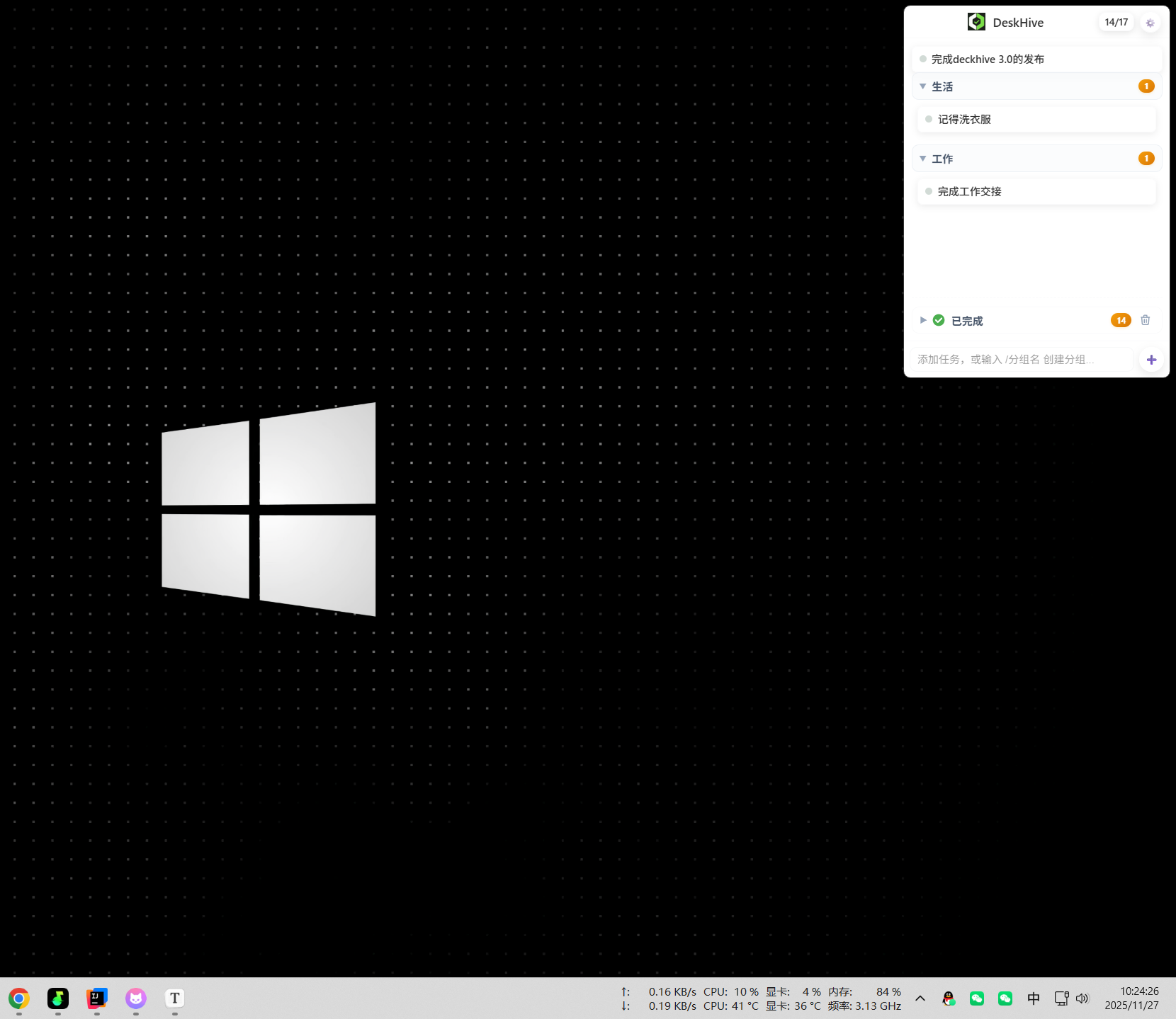
**一个轻量级、高效的桌面待办事项管理工具**
[](https://github.com/yourusername/DeskHive)
[](LICENSE)
[](https://tauri.app/)
[](https://vuejs.org/)
[中文](#中文) | [English](#english)
---
## 中文
### 📖 简介
DeskHive 是一个基于 **Vue 3** 和 **Tauri** 构建的现代化桌面待办事项管理工具。它专注于提供简洁、高效的任务管理体验,所有数据本地存储,无需云端服务,保护您的隐私。
### ✨ 核心特性
#### 🎯 任务管理
- ✅ 快速创建、编辑、删除任务
- ✅ 双击快速删除,右键菜单丰富操作
- ✅ 任务完成状态切换,带动画效果
- ✅ 支持任务拖拽排序(分组内/跨分组)
- ✅ 已完成任务独立分组管理
#### 📁 分组功能
- 📂 快速创建分组:输入 `/分组名` 即可
- 📂 对话框创建:右键"+"按钮选择新建分组
- 📂 分组重命名、删除、折叠/展开
- 📂 分组顺序调整(上移/下移)
- 📂 跨分组拖拽任务
#### ⏰ 时间管理
- 🕐 设置任务截止时间
- 🕐 实时倒计时显示
- 🕐 智能时间指示器:
- 🟢 绿色:距离截止时间充足
- 🔴 红色:已超过截止时间
- 🟡 黄色:任务创建天数提醒
- 🕐 悬停显示详细时间信息
#### 🎨 界面设计
- 🌈 现代化、简洁的 UI 设计
- 🌈 响应式布局,自适应窗口大小
- 🌈 日间/夜间主题切换
- 🌈 窗口透明度自定义
- 🌈 流畅的动画效果
#### 🔧 系统集成
- 💻 系统托盘集成
- 💻 开机自启动选项
- 💻 全局快捷键支持
- 💻 窗口位置记忆
- 💻 禁用拖动窗口选项
### 🚀 快速开始
#### 下载安装
1. 前往 [Releases](https://github.com/yourusername/DeskHive/releases) 页面
2. 下载最新版本的安装包(`.msi` 文件)
3. 双击安装包,按照提示完成安装
4. 启动 DeskHive,开始管理您的任务!
#### 系统要求
- **操作系统**: Windows 10/11 (64位)
- **内存**: 最低 8MB
- **磁盘空间**: 约 50MB
### 📚 使用指南
#### 任务管理
| 操作 | 方法 |
|------|------|
| **创建任务** | 底部输入框输入内容,按回车或点击"+" |
| **快速创建分组** | 输入 `/分组名` 按回车 |
| **完成任务** | 悬停任务,点击"✓"按钮 |
| **取消完成** | 在已完成分组中点击"↶"按钮 |
| **删除任务** | 双击任务项 |
| **编辑任务** | 右键任务 → "✏️ 编辑任务" |
| **拖动排序** | 点住"☰"按钮拖动 |
#### 分组管理
| 操作 | 方法 |
|------|------|
| **快速创建** | 输入 `/分组名` 按回车 |
| **对话框创建** | 右键"+"按钮 → "📁 新建分组" |
| **重命名** | 右键分组标题 → "✏️ 重命名分组" |
| **删除** | 右键分组标题 → "🗑️ 删除分组" |
| **折叠/展开** | 点击分组标题左侧"▼"图标 |
| **调整顺序** | 悬停分组标题,点击"▲▼"按钮 |
#### 时间管理
| 操作 | 方法 |
|------|------|
| **设置截止时间** | 右键任务 → "📅 设置截止时间" |
| **移除截止时间** | 右键任务 → "🗑️ 移除截止时间" |
| **查看时间详情** | 悬停时间指示器 |
#### 拖动功能
- **分组内拖动**: 点住"☰"按钮,在同一分组内上下拖动
- **跨分组拖动**:
- 拖到目标分组任务列表 → 插入指定位置
- 拖到目标分组标题 → 添加到末尾
- **拖动提示**: 目标区域显示蓝色高亮
#### 系统托盘
- **左键点击**: 显示/隐藏主窗口
- **右键菜单**:
- 显示/隐藏
- 设置
- 退出
### 🛠️ 开发指南
#### 技术栈
- **前端框架**: Vue 3.5 + TypeScript
- **构建工具**: Vite 6.4
- **桌面框架**: Tauri 2.0
- **后端语言**: Rust
- **UI 设计**: 自定义 CSS(响应式)
- **数据存储**: 本地 JSON 文件
#### 环境要求
- Node.js >= 20.19.0 或 >= 22.12.0
- Rust 工具链(rustup, cargo)
- npm 或 pnpm
#### 本地开发
```bash
# 克隆仓库
git clone https://github.com/yourusername/DeskHive.git
cd DeskHive
# 安装依赖
npm install
# 启动开发服务器
npm run dev
# 构建生产版本
npm run tauri build
```
#### 项目结构
```
DeskHive/
├── src/ # Vue 前端源码
│ ├── components/ # Vue 组件
│ ├── App.vue # 主应用组件
│ ├── Settings.vue # 设置页面组件
│ ├── types.ts # TypeScript 类型定义
│ └── main.ts # 前端入口
├── src-tauri/ # Tauri 后端源码
│ ├── src/ # Rust 源码
│ │ ├── data/ # 数据管理模块
│ │ ├── window/ # 窗口管理模块
│ │ ├── system/ # 系统集成模块
│ │ └── lib.rs # 主入口
│ ├── Cargo.toml # Rust 依赖配置
│ └── tauri.conf.json # Tauri 配置
├── public/ # 静态资源
└── package.json # Node.js 依赖配置
```
### 📝 更新日志
#### v0.3.0 (2025-11-27)
**✨ 新增功能**
- 快速创建分组:输入 `/分组名` 直接创建
- 优化时间指示器位置:移到任务条最右侧
- 截止时间弹窗缩小:更符合整体风格
- 改进"全部完成"页面显示逻辑
**🐛 问题修复**
- 修复输入 `/分组名` 还会弹窗的问题
- 修复任务列表显示过宽的问题
- 改进应用退出逻辑,减少安装时卡住的可能性
- 修复空分组提示框占据空间的问题
**📝 文档更新**
- 更新设置页面的使用说明
- 完善 README 文档
#### v0.2.0 (2025-11-22)
**✨ 新增功能**
- 任务拖动排序:支持分组内和跨分组拖动
- 分组排序:可通过上下箭头调整分组顺序
- 时间提示:悬停时间指示器显示详细信息
- 完成动画:优化任务完成时的视觉效果
**🎨 界面优化**
- 重新设计时间指示器样式和颜色
- 优化已完成分组的高度和间距
- 改进任务完成状态的视觉反馈
- 添加自定义 Tooltip 组件
**🐛 问题修复**
- 修复跨组拖动任务的问题
- 修复提示框被分组遮挡的问题
- 移除按截止时间自动排序的逻辑
### 🤝 贡献指南
欢迎提交 Issue 和 Pull Request!
1. Fork 本仓库
2. 创建您的特性分支 (`git checkout -b feature/AmazingFeature`)
3. 提交您的更改 (`git commit -m 'Add some AmazingFeature'`)
4. 推送到分支 (`git push origin feature/AmazingFeature`)
5. 开启一个 Pull Request
### 📧 联系方式
- **作者**: iamlzy
- **博客**: [https://www.feijimiao.cn](https://www.feijimiao.cn/contact)
- **微信公众号**: 扫描下方二维码关注
### 📄 许可证
本项目采用 MIT 许可证 - 查看 [LICENSE](LICENSE) 文件了解详情
### 🙏 致谢
- [Tauri](https://tauri.app/) - 强大的桌面应用框架
- [Vue.js](https://vuejs.org/) - 渐进式 JavaScript 框架
- [Vite](https://vitejs.dev/) - 下一代前端构建工具
---
## English
### 📖 Introduction
DeskHive is a modern desktop to-do management tool built with **Vue 3** and **Tauri**. It focuses on providing a clean and efficient task management experience with all data stored locally, no cloud services required, protecting your privacy.
### ✨ Key Features
#### 🎯 Task Management
- ✅ Quick create, edit, and delete tasks
- ✅ Double-click for quick deletion, rich context menu
- ✅ Task completion status toggle with animations
- ✅ Drag and drop task reordering (within/across groups)
- ✅ Completed tasks in separate group
#### 📁 Group Management
- 📂 Quick create: Type `/group-name` and press Enter
- 📂 Dialog create: Right-click "+" button
- 📂 Rename, delete, collapse/expand groups
- 📂 Adjust group order (move up/down)
- 📂 Drag tasks between groups
#### ⏰ Time Management
- 🕐 Set task deadlines
- 🕐 Real-time countdown display
- 🕐 Smart time indicators:
- 🟢 Green: Sufficient time until deadline
- 🔴 Red: Past deadline
- 🟡 Yellow: Days since task creation
- 🕐 Hover for detailed time information
#### 🎨 Interface Design
- 🌈 Modern, clean UI design
- 🌈 Responsive layout, adaptive window size
- 🌈 Day/Night theme switching
- 🌈 Customizable window transparency
- 🌈 Smooth animations
#### 🔧 System Integration
- 💻 System tray integration
- 💻 Auto-start on boot option
- 💻 Global hotkey support
- 💻 Window position memory
- 💻 Disable window dragging option
### 🚀 Quick Start
#### Download & Install
1. Go to [Releases](https://github.com/yourusername/DeskHive/releases) page
2. Download the latest version installer (`.msi` file)
3. Double-click the installer and follow the prompts
4. Launch DeskHive and start managing your tasks!
#### System Requirements
- **OS**: Windows 10/11 (64-bit)
- **RAM**: Minimum 10MB
- **Disk Space**: ~50MB
### 📚 User Guide
#### Task Management
| Action | Method |
|--------|--------|
| **Create Task** | Enter content in bottom input, press Enter or click "+" |
| **Quick Create Group** | Type `/group-name` and press Enter |
| **Complete Task** | Hover over task, click "✓" button |
| **Uncomplete Task** | Click "↶" button in completed group |
| **Delete Task** | Double-click task item |
| **Edit Task** | Right-click task → "✏️ Edit Task" |
| **Drag to Reorder** | Hold "☰" button and drag |
#### Group Management
| Action | Method |
|--------|--------|
| **Quick Create** | Type `/group-name` and press Enter |
| **Dialog Create** | Right-click "+" button → "📁 New Group" |
| **Rename** | Right-click group header → "✏️ Rename Group" |
| **Delete** | Right-click group header → "🗑️ Delete Group" |
| **Collapse/Expand** | Click "▼" icon on left of group header |
| **Adjust Order** | Hover group header, click "▲▼" buttons |
#### Time Management
| Action | Method |
|--------|--------|
| **Set Deadline** | Right-click task → "📅 Set Deadline" |
| **Remove Deadline** | Right-click task → "🗑️ Remove Deadline" |
| **View Details** | Hover over time indicator |
#### Drag & Drop
- **Within Group**: Hold "☰" button, drag up/down within same group
- **Between Groups**:
- Drag to target group's task list → Insert at position
- Drag to target group's header → Add to end
- **Visual Feedback**: Target area shows blue highlight
#### System Tray
- **Left Click**: Show/Hide main window
- **Right Click Menu**:
- Show/Hide
- Settings
- Quit
### 🛠️ Development Guide
#### Tech Stack
- **Frontend**: Vue 3.5 + TypeScript
- **Build Tool**: Vite 6.4
- **Desktop Framework**: Tauri 2.0
- **Backend**: Rust
- **UI Design**: Custom CSS (Responsive)
- **Data Storage**: Local JSON files
#### Prerequisites
- Node.js >= 20.19.0 or >= 22.12.0
- Rust toolchain (rustup, cargo)
- npm or pnpm
#### Local Development
```bash
# Clone repository
git clone https://github.com/yourusername/DeskHive.git
cd DeskHive
# Install dependencies
npm install
# Start development server
npm run dev
# Build for production
npm run tauri build
```
#### Project Structure
```
DeskHive/
├── src/ # Vue frontend source
│ ├── components/ # Vue components
│ ├── App.vue # Main app component
│ ├── Settings.vue # Settings page component
│ ├── types.ts # TypeScript type definitions
│ └── main.ts # Frontend entry
├── src-tauri/ # Tauri backend source
│ ├── src/ # Rust source
│ │ ├── data/ # Data management module
│ │ ├── window/ # Window management module
│ │ ├── system/ # System integration module
│ │ └── lib.rs # Main entry
│ ├── Cargo.toml # Rust dependencies
│ └── tauri.conf.json # Tauri configuration
├── public/ # Static assets
└── package.json # Node.js dependencies
```
### 📝 Changelog
#### v0.3.0 (2025-11-27)
**✨ New Features**
- Quick group creation: Type `/group-name` to create directly
- Optimized time indicator position: Moved to rightmost of task bar
- Smaller deadline dialog: Better matches overall style
- Improved "All Completed" page display logic
**🐛 Bug Fixes**
- Fixed issue where typing `/group-name` still showed dialog
- Fixed task list display too wide issue
- Improved app exit logic to reduce installation hang
- Fixed empty group hint taking up space
**📝 Documentation**
- Updated settings page usage instructions
- Enhanced README documentation
#### v0.2.0 (2025-11-22)
**✨ New Features**
- Task drag and drop: Support within and across groups
- Group sorting: Adjust order with up/down arrows
- Time tooltips: Hover time indicator for details
- Completion animation: Optimized visual feedback
**🎨 UI Improvements**
- Redesigned time indicator style and colors
- Optimized completed group height and spacing
- Improved task completion status visual feedback
- Added custom Tooltip component
**🐛 Bug Fixes**
- Fixed cross-group task dragging issues
- Fixed tooltip being covered by groups
- Removed auto-sort by deadline logic
### 🤝 Contributing
Issues and Pull Requests are welcome!
1. Fork this repository
2. Create your feature branch (`git checkout -b feature/AmazingFeature`)
3. Commit your changes (`git commit -m 'Add some AmazingFeature'`)
4. Push to the branch (`git push origin feature/AmazingFeature`)
5. Open a Pull Request
### 📧 Contact
- **Author**: iamlzy
- **Blog**: [https://www.feijimiao.cn](https://www.feijimiao.cn/contact)
- **WeChat Official Account**: Scan QR code below
### 📄 License
This project is licensed under the MIT License - see the [LICENSE](LICENSE) file for details
### 🙏 Acknowledgments
- [Tauri](https://tauri.app/) - Powerful desktop application framework
- [Vue.js](https://vuejs.org/) - Progressive JavaScript framework
- [Vite](https://vitejs.dev/) - Next generation frontend tooling
---
Made with ❤️ by iamlzy
